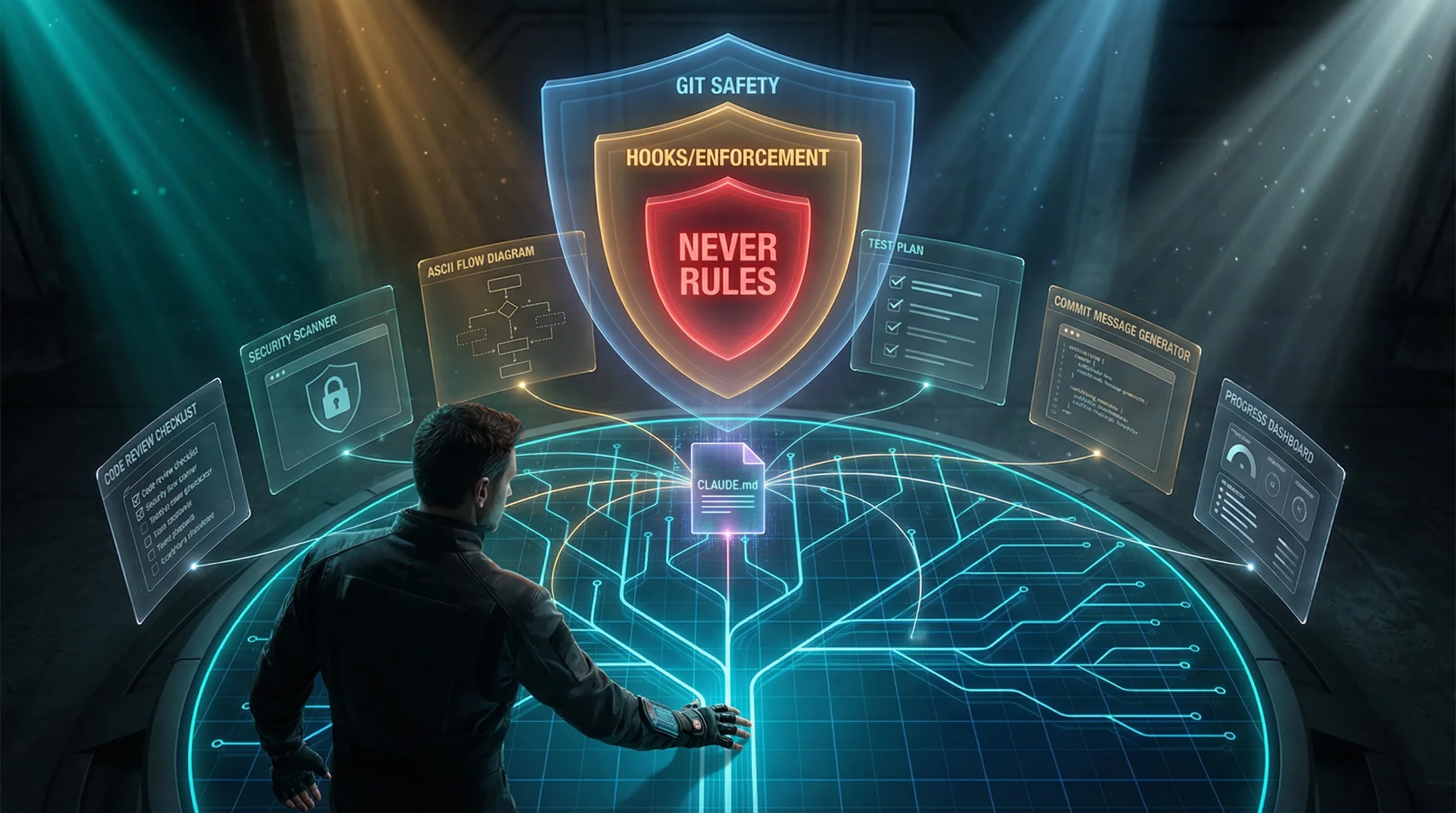
What's Included
Everything you need to start a Claude Code project the right way — security, automation, documentation, and testing all pre-configured.
CLAUDE.md
Battle-tested project instructions with numbered critical rules for security, TypeScript, StrictDB, testing, and deployment.
Global CLAUDE.md
Security gatekeeper for all projects. Never publish secrets, never commit .env files, standardized scaffolding rules.
10 Hooks
Deterministic enforcement that always runs. Blocks dangerous shell commands, lints on save, scans for leaked credentials, branch protection, port conflicts, Rybbit pre-deploy gate, E2E test gate, env sync warnings, RuleCatch monitoring (optional - skips silently if not installed), and file length warnings that fire when a file exceeds the 300-line limit.
27 Slash Commands (16 project + 11 kit management)
/mdd, /help, /quickstart, /install-global, /install-mdd, /setup, /show-user-guide, /diagram, /review, /commit, /progress, /test-plan, /architecture, /new-project, /security-check, /optimize-docker, /create-e2e, /create-api, /worktree, /what-is-my-ai-doing, /refactor, /set-project-profile-default, /add-project-setup, /projects-created, /remove-project, /convert-project-to-starter-kit, /update-project, /add-feature
Skills (25)
Context-aware templates that load on demand. Covers code review, testing, debugging, Docker, Node.js, MongoDB, NGINX, accessibility, web performance, responsive CSS, and more.
Custom Agents
Read-only code reviewer for security audits. Test writer that creates tests with explicit assertions, not just “page loads.”
Documentation
Pre-structured ARCHITECTURE.md, INFRASTRUCTURE.md, and DECISIONS.md templates that Claude actually follows.
Testing Templates
Master test checklist, issue tracking log, and StrictDB — a unified database driver that prevents connection pool explosion. Built-in sanitization and guardrails allow safe operators while stripping dangerous ones.
Live AI Monitor
See every tool call, token, cost, and file access in real-time. Free monitor mode works instantly — no API key, no setup. Run pnpm ai:monitor in a separate terminal. Zero token overhead.
MDD Workflow STANDALONE
Manual-Driven Development — the built-in methodology that turns Claude Code from a code generator into a development partner. Every feature starts with documentation. Every fix starts with an audit.
/mdd now asks if you want to work in an isolated worktree — run multiple /mdd sessions simultaneously, each in its own directory and branch. Use /worktree for complete isolation.
Stop Reducing Tokens. Start Clarifying Context.
I’ve tried every approach to improve Claude’s output. Context managers, prompt compression, elaborate system prompts. Then I built MDD, and I haven’t needed any of them since. I use MDD in every Claude project I work on now. The difference in results is night and day.
Here’s what changed my thinking: token reduction tools solve the wrong problem. Compressing context means Claude fills the gaps with assumptions. Assumptions become bugs. The more you compress, the more follow-up sessions it takes to fix what Claude misunderstood.
MDD does the opposite. One feature doc instead of 40 source files. The .mdd/.startup.md snapshot orients Claude in ~100–200 tokens at the start of every session — not because we removed information, but because we made it dense. Every token earns its place. Claude reads less, understands more, and produces better output on the first pass.
Token reduction is a side effect of clarity. It is not the goal. The goal is results that don’t require three sessions to fix.
What is MDD?
Most people prompt Claude Code like this: "fix the bug in my auth system." Claude reads 40 files, burns through context trying to understand your architecture, and produces something that technically compiles but misses the bigger picture.
MDD flips this. You write structured documentation first, then Claude reads one doc instead of 40 files. It gets the full picture in 200 tokens instead of 20,000. Every phase reads the output of the previous phase, compressing context further at each step.
The Workflow
Usage
One command, fifteen modes:
# Build a new feature (Analyze → Document → Test skeletons → Plan → Implement → Verify)
/mdd user authentication with JWT tokens

# Audit existing code (Scope → Read + Notes → Analyze → Present → Fix)
/mdd audit
/mdd audit database    # audit a specific section

# Check MDD status — includes lightweight drift summary
/mdd status

# Detect doc drift: source files changed outside MDD since last sync
/mdd scan

# Update an existing feature doc after code changed
/mdd update 04

# Generate docs from code, or regenerate + compare an existing doc
/mdd reverse-engineer src/handlers/payments.ts
/mdd reverse-engineer 07

# Show ASCII dependency graph with broken/risky dep warnings
/mdd graph

# Archive a deprecated feature cleanly
/mdd deprecate 03

# Fix all UNTRACKED docs in one pass (missing last_synced/status/phase)
/mdd upgrade

# ── Initiative / Wave Planning (NEW) ──────────────────────────────────────────

# Create an initiative (groups related waves into one roadmap item)
/mdd plan-initiative "auth system"             # guided mode
/mdd plan-initiative "auth system" --template  # write raw markdown yourself

# Add a wave (a phase of work with a concrete demo state)
/mdd plan-wave auth-system "Auth Foundation"

# Execute a wave — turns planned features into MDD docs
/mdd plan-execute auth-system-wave-1

# Re-stamp waves after editing the parent initiative
/mdd plan-sync auth-system

# Remove a feature from a wave (before it has a doc)
/mdd plan-remove-feature auth-system-wave-1 auth-signup

# Cancel an initiative and all planned work
/mdd plan-cancel-initiative auth-system

# Show a reference table of every /mdd mode and what it does
/mdd commands
Build Mode — New Features
When you run /mdd <feature description>, Claude follows a structured 7-phase process:
- Phase 1 — Understand — Reads your architecture, existing docs, asks all questions upfront
- Phase 2 — Analyze — Data Flow & Impact Analysis (mandatory gate): reads the existing code the feature will touch, traces every data value end-to-end (backend → API → frontend → UI transformation), checks for parallel computations of the same concept, greps for all usages of modified endpoints, and presents findings before documentation begins. Skipped automatically on greenfield projects (<5 source files, no existing MDD docs).
- Phase 3 — Document — Creates a numbered MDD doc in
.mdd/docs/with full YAML frontmatter including adata_flow:field pointing to the Phase 2 analysis - Phase 4 — Test Skeletons + Red Gate — Generates failing tests from the documentation (Doc → Test → Code). Unit and E2E skeletons generated in parallel when both are needed. Red Gate then runs the new test files to confirm every skeleton actually fails — any skeleton that passes vacuously (no real assertion) or is already satisfied by pre-existing code is fixed before implementation begins.
- Phase 5 — Plan — Presents the build plan as commit-worthy blocks: each block has a runnable end-state, a conventional commit scope, a verification command, and a handoff contract. Independent blocks are annotated for parallel execution after a file-overlap and type-dependency gate. Simple features (<3 files, no API, no DB) keep the flat step format.
- Phase 6 — Implement + Green Gate — Executes blocks in dependency-layer order. Parallel blocks launch 2 agents simultaneously with self-contained prompts; a typecheck runs after each parallel batch before the next layer starts. Each block runs a Green Gate: a 5-iteration diagnosis-first loop. Every iteration requires stating the exact root cause and one targeted fix before applying it. At iteration 5, the loop stops and reports to the user — no blind retrying. Regression check runs after each block goes green.
- Phase 7 — Verify + Integration Gate — Phase 7a: full test suite + typecheck. Phase 7b: Integration Gate verifies real behavior (real HTTP calls, real DB writes, real browser rendering — feature-type-aware checklist). Default stance on any anomaly: “my code is wrong until proven otherwise” — read logs, run a minimal probe, form a specific hypothesis before accepting an external blocker. Phase 7c: reports
✅ MDD Completeif verified, or⏸ MDD Blockedwith a concrete next step if an external condition prevented verification.
Tests are generated before code. They define the finish line. If a test fails, the implementation gets fixed — not the test. The Red Gate ensures the finish line is actually a finish line.
Why Phase 2 matters: In a maturing project, the most common class of bug isn’t in the new code — it’s in the assumption that existing data is correct and consistent. An AI sees projectedProgress: number on a type and assumes it’s ready to use, without tracing how that value was computed. Phase 2 forces that trace to happen before a single line of documentation is written, catching divergent parallel computations before they become UI bugs that take 3 sessions to debug.
Audit Mode — Existing Code
When you run /mdd audit, Claude runs a complete security and quality audit:
- Scope — Reads all
.mdd/docs/files, builds the feature map - Read + Notes — Parallelized: features batched across up to 3 parallel Explore agents, each reading assigned source files and returning structured notes; main conversation is single writer. Single-feature audits stay sequential. Notes written to disk so findings survive context compaction.
- Analyze — Reads only the notes (not source code again), produces findings report
- Present — Shows top issues with severity, estimated fix time, asks what to fix
- Fix — Applies fixes from the report, writes tests, updates documentation
More Modes — Drift Detection, Doc Lifecycle & Planning
/mdd task <description>— Task mode. Identical to Build mode, but stamps the resulting doc withtype: task— frozen after completion and permanently excluded from drift detection. Use for one-off work (investigations, refactors, tooling sessions) that is done-and-finished by definition. Task docs appear in a separate frozen section in/mdd scanand are counted separately in/mdd status./mdd scan— Detects documentation drift. Parallelized: a single Explore agent runs allgit log --after="<last_synced>"checks in one pass and returns a classification table, eliminating the sequential bottleneck on large feature sets. Reports ✅ in sync / ⚠️ drifted / ❌ broken / ❓ untracked. Task docs (type: task) are excluded from drift checks and shown in a separate frozen section. Also checks for stale waves (waveinitiativeVersionout of sync with parent initiative). The fix for drift is/mdd update./mdd update <feature-id>— Re-syncs an existing feature doc after code has changed. Diffs code vs doc, presents what changed, rewrites only the affected sections, appends new test skeletons for new behaviors, and updateslast_syncedin frontmatter./mdd reverse-engineer [path|id]— Generates MDD docs from existing code. Works on undocumented files (new doc) or existing docs (regenerate + compare). Parallelized for multi-file scope: ≤3 files read in main conversation; 4+ files batched across up to 3 Explore agents returning structured inference output (purpose, models, routes, rules, edge cases), synthesized into the doc draft. In regenerate mode, shows old vs new side-by-side so you can merge rather than overwrite./mdd graph— Renders an ASCII dependency map fromdepends_onfields. Flags broken dependencies (deprecated features still referenced), risky dependencies (complete features depending on draft/in-progress ones), and orphans. When.mdd/initiatives/exists, also renders an initiative → wave → feature hierarchy tree with progress indicators and broken doc-path warnings./mdd deprecate <feature-id>— Retires a feature: setsstatus: deprecated, moves doc to.mdd/docs/archive/, adds known-issue warnings to all dependents, and optionally deletes source and test files (asks separately for each)./mdd upgrade— Batch-patches missinglast_synced,status, andphasefrontmatter fields across all.mdd/docs/files. Non-destructive — existing fields are never overwritten.last_syncedis inferred fromgit logon each doc file (preserving actual history, not defaulting to today). Shows a full plan before writing. Run this once if the MDD Dashboard shows all docs as UNTRACKED (❓) — it converts them all to IN SYNC in a single pass./mdd commands— Prints a reference table of every MDD mode and what it does. Output is derived from the mode-detection block inmdd.mdat runtime, so it stays in sync automatically as new modes are added — nothing is hardcoded.- MDD versioning — Every file created or updated by MDD is stamped with
mdd_version: Nin its frontmatter, matching the version declared inmdd.md./mdd statusshows a breakdown of files by version so you can see at a glance what’s out of sync./install-mddand/install-global mddcomparemdd_versionbetween source and installed file before overwriting — no silent updates. Files withoutmdd_version(created before versioning) are treated as version 0 and flagged as outdated.
Initiative & Wave Planning NEW
MDD Waves adds a three-level planning hierarchy on top of feature docs: Initiatives → Waves → Feature docs. An initiative is a roadmap item (e.g., “Auth System”); a wave is a phase of that initiative with a concrete demo state; feature docs are the individual MDD docs built by /mdd plan-execute.
/mdd plan-initiative <title>— Creates a new initiative in.mdd/initiatives/. Guided mode interviews you about goals, target audience, and open product questions.--templateflag skips the interview and writes the raw markdown file for you to fill in. Collision-checks slugs against existing initiatives and blocks if active wave docs exist for that slug./mdd plan-wave <initiative-id> <wave-title>— Adds a wave to an existing initiative. Captures the demo state (what a user can do when this wave ships), the feature list with inter-feature dependencies, and open research questions. Writes to.mdd/waves/stamped with the initiative’s current version./mdd plan-execute <wave-id>— Runs/mdd <feature>build mode for each planned feature in the wave that doesn’t have a doc yet. Supports automated (run all) or interactive (confirm each) modes. UpdatesdocPathandwaveStatusin the wave file as docs are created./mdd plan-sync <initiative-id>— Re-stamps all child wave files with the initiative’s current version after the initiative is edited. Run this to clear stale-wave warnings from/mdd scan./mdd plan-remove-feature <wave-id> <feature-slug>— Removes a feature from a wave before it has been executed. Hard-stops if the feature already has adocPath— use/mdd deprecatefor that./mdd plan-cancel-initiative <initiative-id>— Sets the initiative and all child waves tocancelled. Warns if any wave has executed features and asks how to handle them. Cancelled initiatives remain visible in the TUI dashboard (shown in gray) for historical reference.
The MDD Dashboard TUI gains a collapsible INITIATIVES section at the top of the left panel. Press Enter or → on an initiative to expand its waves; press i to jump directly to the first initiative. The status bar shows total initiative count and active wave progress.
The .mdd/ Directory
All MDD artifacts live in a single dotfile directory, gitignored by default:
.mdd/
├── docs/                        # Feature documentation (one per feature)
│   ├── 01-project-scaffolding.md  # YAML frontmatter: last_synced, status, phase
│   ├── 02-profile-system.md
│   └── archive/                 # Deprecated feature docs (/mdd deprecate)
├── initiatives/                 # Initiative files (/mdd plan-initiative)
│   └── auth-system.md           # id, title, status, version, hash, overview
├── waves/                       # Wave files (/mdd plan-wave)
│   └── auth-system-wave-1.md    # features table + docPath, waveStatus per feature
└── audits/                      # Audit artifacts
    ├── notes-2026-03-01.md      # Raw reading notes
    ├── report-2026-03-01.md     # Structured findings
    ├── results-2026-03-01.md    # Before/after summary
    ├── scan-2026-04-12.md       # Drift report (/mdd scan)
    └── graph-2026-04-12.md      # Dependency graph (/mdd graph)
Real Results: Self-Audit
We used MDD to audit this starter kit — the same methodology the kit teaches. Here's what happened:
| Phase | Time | Output |
|---|---|---|
| Phase 0: Documentation | ~25 min | 9 feature docs (795 lines) in .mdd/docs/ |
| Phase 1: Read + Notes | 9 min 51s | 57+ files read, 837 lines of notes |
| Phase 2: Analyze | 2 min 39s | 298-line report, 20 findings |
| Phase 3: Fix All | 10 min 53s | 17/20 fixed, 125 tests written |
| Total | ~48 min | 20 findings, 125 tests from zero |
| Metric | Before MDD | After MDD |
|---|---|---|
| Unit tests | 0 | 94 |
| Test files | 0 | 5 |
| Documentation files | 3 | 14 |
| Known issues documented | 0 | 84 |
| Findings found & fixed | 0 | 17/20 |
| Quality gate violations | 1 (651-line file) | 0 (split into 5 modules) |
| Config validation | None (raw JSON.parse) | Zod schema with fail-fast |
| Secret detection patterns | 4 basic | 10+ (GitHub, Slack, Stripe, PEM, JWT) |
Why It Works
The problem with Claude Code isn't intelligence — it's context. A 200K token window sounds huge until you're reading 40 files and burning 80% of context on comprehension before writing a single line of output.
MDD makes each phase a context compressor: documentation compresses 40 files into 1 doc, raw notes compress all source code into a single file, the audit report compresses notes into severity-rated findings. By the time Claude writes code, it's working from a 300-line report — not a 40,000-line codebase. It's not problem-solving. It's pattern-matching.
The Incremental Write Trick
The most important technical detail: when Claude reads files during an audit, context will compact. If your findings are only in Claude's memory, they're gone.
Instead, Claude writes notes to disk every 2 features. If context compacts, it reads the tail of the notes file and picks up where it left off. We've run this pattern across 6 complete audit cycles. Zero data loss.
After processing every 2 features, immediately append your notes to
.mdd/audits/notes.md. If context compacts, read the TAIL of the notes
file and continue from where you left off.
Startup Context
Every Claude Code session starts cold. Without context, Claude reads dozens of files to understand your project — burning thousands of tokens before writing a single line of output. The MDD Startup Context system eliminates this entirely.
.mdd/.startup.md is a compact project snapshot that the SessionStart hook injects automatically at the start of every session — including after /clear and after context compaction. Claude reads one file (~100–200 tokens) instead of your entire codebase. It is regenerated automatically by /mdd commands and gitignored — it is machine state, not source code.
- Auto-generated zone (above the
---divider) — rebuilt automatically at several points: after/mdd <feature>writes documentation (Phase 3), after/mdd auditproduces a findings report (Phase A3), after audit fixes complete (Phase A5), and on-demand via/mdd status. Contains git branch, stack summary, features list, last audit results, and rules quick-reference. - Notes zone (below the
---divider) — append-only, never overwritten. Your own timestamped annotations added with/mdd note.
Example file:
## Project Snapshot
Generated: 2026-03-04 | Branch: feat/webserver

## Stack
Framework: Next.js | DB: MongoDB (StrictDB) | Host: Dokploy

## Features Documented (4)
01-project-scaffolding -- complete
02-profile-system -- complete
03-auth -- complete
04-webserver -- IN PROGRESS

## Last Audit
Date: 2026-03-01 | Findings: 20 | Fixed: 17 | Open: 3
Open: ssl-redeploy-race, nginx-log-tab, e2e-coverage-gap

## Rules Summary
Read CLAUDE.md for full rules. Key rules:
- TypeScript always, strict mode, no any
- StrictDB only -- no raw drivers
- /api/v1/ prefix on all endpoints
- No file > 300 lines, no function > 50 lines
- Never commit .env

---

## Notes
- [2026-03-04] ssl issue is a docker swarm bug, not nginx
- [2026-03-04] waiting on Anthropic SessionStart fix for startup source| Command | What it does |
|---|---|
/mdd status | Regenerate .startup.md from current project state |
/mdd note "text" | Append a timestamped note to the Notes zone |
/mdd note list | Print only the Notes section |
/mdd note clear | Wipe the Notes section (asks for confirmation) |
Startup context injection was previously handled by session-context.sh, which was wired to fire on startup, clear, and compact sources. This hook was removed in v1.2. Session context is now handled differently - the MDD snapshot is rendered by the MDD package itself rather than a shell hook.
Why not just use CLAUDE.md? CLAUDE.md is rules. .startup.md is state. Rules change rarely — you write them once and they compound over time. State changes constantly — current branch, active features, open findings. Mixing them means Claude re-reads your entire rulebook to find out what branch you are on. Separating them means each file stays small, focused, and cheap to load.
SessionStart hook with source: "startup" has a known intermittent bug in some Claude Code versions where context injection is silently skipped on brand new sessions. It works reliably on /clear and compaction. Run /clear at the start of any session where you need guaranteed context injection. This is an upstream Claude Code issue being tracked.
MDD Dashboard — Terminal TUI
The mdd package is a standalone terminal dashboard for MDD workspaces. Run it inside any project with a .mdd/ folder to get a real-time, interactive view of your workspace health — without leaving VS Code.
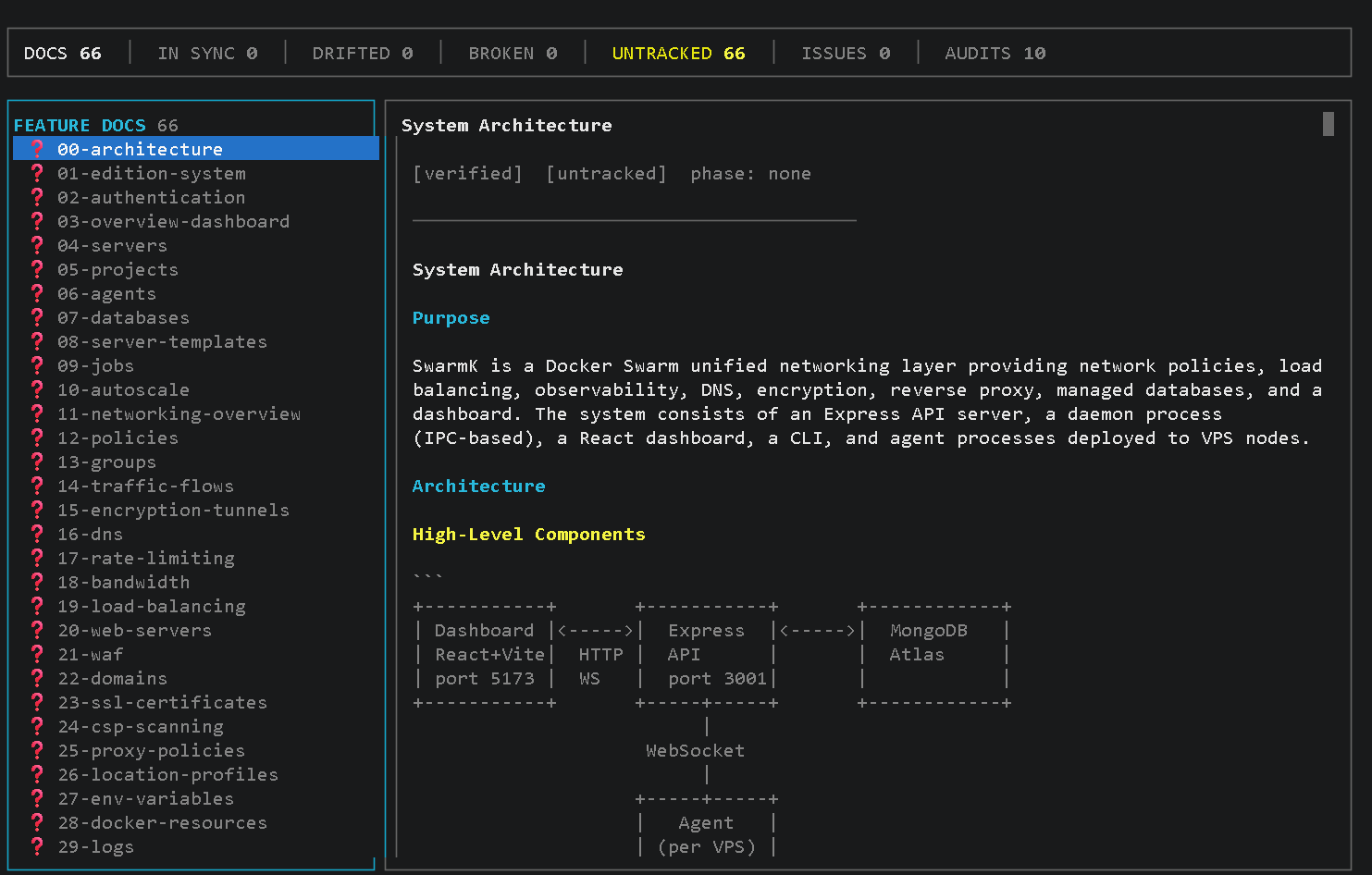
npm install -g mdd-tuiThen inside any project with a .mdd/ folder:
mdd              # opens the interactive TUI
mdd dashboard    # same
mdd status       # same — all three open the dashboard
Left Panel
INITIATIVES (collapsible tree, shown when .mdd/initiatives/ exists) → feature docs → audit reports → dep graph. ↑↓ to navigate, Enter to expand an initiative.
Right Panel
Initiative overview & wave detail, or full doc/audit content with drift chips, frontmatter badges, and scrollable markdown. Press → to focus, ↑↓ to scroll, ← to return.
Status Bar
Live counts: docs · in-sync · drifted · broken · untracked · issues · audits · initiatives · active waves. Updated on every r refresh.
Drift Detection
Auto-runs git log against each doc's last_synced field. Docs whose source_files changed since last sync are marked ⚠️ drifted. Stale waves (version mismatch) flagged separately.
Ops Mode NEW
Document-first deployments — the same discipline MDD brings to features, now applied to ops tasks. Runbooks replace improvised deploys. Every region is gated. If canary fails, primary is never touched.
/mdd runop executes it every time.
The Four Commands
/mdd ops <description>
Create a new deployment runbook. First asks: global (~/.claude/ops/) or project-scoped (.mdd/ops/)? Interviews you about services, regions, health checks, rollback criteria, and deployment strategy. Produces a structured YAML-frontmatter runbook that runop can execute.
/mdd runop <slug>
Execute a runbook end-to-end: pre-flight health check → canary-gated region deploy → post-flight verify. Checks project-local first, then global. Reads the ops doc as the source of truth. If any gate fails, execution stops — the next region is never touched.
/mdd update-op <slug>
Edit an existing runbook. Checks project-local first, then global. Updates services, regions, health endpoints, rollback criteria, or deployment strategy. Re-validates the runbook structure after editing.
/mdd ops list
Show all runbooks — global and project-scoped — in a unified view. Displays slug, scope, platform, environments, and status so you can see everything available at a glance.
Global vs Project Scope
/mdd ops asks scope as its very first question. The answer controls where the runbook is stored and how it is shared.
| Scope | Location | Available | Use for |
|---|---|---|---|
| Global | ~/.claude/ops/<slug>.md |
All projects | Docker Hub login, DNS updates, Vercel deploys, reusable infrastructure tasks |
| Project | .mdd/ops/<slug>.md |
This project only | Service-specific deploys, project env vars, region-specific image names |
.env variables or project paths. They have access to ~/.env globals only. If your runbook needs DOCKER_HUB_TOKEN or other global secrets, store them in ~/.env and reference them there.
docker-hub-push already exists, you cannot create a project op with the same slug. This is a hard stop — no silent shadowing. Rename one of them to avoid ambiguity.
Listing All Runbooks
/mdd ops list shows all runbooks across both scopes in a unified view:
Ops Runbooks
────────────────────────────────────────────────────────────

Global (~/.claude/ops/)
  docker-hub-login       docker-hub    all projects    complete
  dns-cloudflare         manual        all projects    draft

Project (.mdd/ops/)
  rulecatch-dokploy      dokploy       staging, prod   in_progress
  api-rollback           manual        production      draft

4 runbooks total (2 global, 2 project)
Run /mdd runop <slug> to execute any runbook.
The Runbook Concept
A runbook is a structured ops document in .mdd/ops/ with YAML frontmatter declaring services, regions, deployment order, health check endpoints, and gate behaviour. It is the single source of truth for a deployment. /mdd runop reads it and executes it — you do not hand-craft the sequence each time.
Write once, runs every time. Once a runbook exists, every future deployment of that service runs through the same documented sequence, with the same pre-flight checks, the same canary gate, and the same post-flight verification. Nothing falls through the cracks because someone forgot a step.
Canary Deployment Pattern
Ops Mode enforces a canary-first deployment model. Regions are ordered by deploy_order in the runbook frontmatter. The canary region always deploys first — only if all its services pass the health gate does the primary region proceed.
If the canary gate fails — any service unhealthy after deploy — the primary region is never touched. It is still running the old version. You can redeploy to canary, skip that region, or abort entirely. The gate behaviour is configurable: stop (default), skip_region, or rollback.
Pre-flight Health Check
Before any deployment begins, /mdd runop checks the current health of all services across all regions. If a service is already failing before you deploy, you know upfront — not after the deploy makes it worse. The pre-flight table surfaces this clearly and prompts for a decision:
Pre-flight Health Check — rulecatch-dokploy
──────────────────────────────────────────────────
                     eu-west (canary)  us-east (primary)
api                  ✓ healthy         ✓ healthy
dashboard            ✗ failing         ✓ healthy
worker               ✓ healthy         ✓ healthy

dashboard is failing in eu-west. Redeploy, skip, or abort?
Canary Gate Output
After the canary deploy completes, /mdd runop re-checks every service in the canary region. The gate output shows exactly which image each service is running and its health status:
── eu-west (canary) — gate check ──────────────
api         ✓ healthy  (rulecatch-api-eu:latest)
dashboard   ✓ healthy
worker      ✓ healthy
Gate: PASSED ✓ — advancing to us-east (primary)
Multi-Region, Multi-Image Support
Each service can have a different Docker image name per region. This supports regional image registries, blue-green strategies, or teams that maintain separate EU and US image builds. Per-region health status is tracked in the runbook frontmatter so the dashboard can show the last-known state of every region at a glance.
Per-Region Images
Each service declares its image name per region in the runbook frontmatter. runop reads the correct image for each region automatically — no manual substitution.
Health Status Tracking
After each runop execution, the runbook frontmatter is updated with the last-known health status per region and service. /mdd status can surface this in the startup context.
Deployment Strategies
deployment_strategy: sequential deploys regions one at a time with gates between each. deployment_strategy: parallel deploys non-canary regions simultaneously after the canary gate passes.
Gate Behaviour
gate_on_fail: stop halts execution (default). skip_region logs the failure and continues to remaining regions. rollback triggers the runbook’s defined rollback procedure before stopping.
Directory Structure
Project runbooks live in .mdd/ops/. Global runbooks live in ~/.claude/ops/ alongside your other global Claude config:
# Project-scoped runbooks (this project only)
.mdd/
├── docs/                          # Feature documentation
├── ops/                           # Project deployment runbooks
│   ├── rulecatch-dokploy.md       # Multi-region Dokploy deploy runbook
│   └── api-rollback.md            # Emergency rollback runbook
├── initiatives/
├── waves/
└── audits/

# Global runbooks (available in every project)
~/.claude/
├── commands/                      # Global slash commands
├── skills/                        # Global skills
├── ops/                           # Global deployment runbooks ← NEW
│   ├── docker-hub-login.md        # Reusable Docker Hub auth runbook
│   └── dns-cloudflare.md          # DNS update runbook (any project)
└── CLAUDE.md
Project runbooks are gitignored by default alongside the rest of .mdd/ — they contain environment-specific configuration (region URLs, health endpoints, image names) that belongs in your local workspace, not version control. Global runbooks persist in your home directory and are never project-specific.
Featured Packages
Five open-source npm packages by TheDecipherist — the same developer behind this starter kit — are integrated into project profiles. All are MIT-licensed.
ClassMCP — Semantic CSS for AI
MCP server that provides semantic CSS class patterns to Claude, reducing token usage when generating or editing styles. Auto-added to the mcp field in CSS-enabled profiles.
claude mcp add classmcp -- npx -y classmcp@latestStrictDB-MCP — Database Context for AI
MCP server that gives Claude direct access to StrictDB schema discovery, query validation, and explain plans. Claude can inspect collection schemas, dry-run queries, and understand database structure without you pasting it into context. Auto-added to the mcp field in database-enabled profiles.
claude mcp add strictdb-mcp -- npx -y strictdb-mcp@latestnpm: strictdb-mcp
Classpresso — Post-Build CSS Optimization
Consolidates CSS classes after build for 50% faster style recalculation with zero runtime overhead. Auto-added as a devDependency in CSS-enabled profiles. Runs automatically after pnpm build.
pnpm add -D classpressonpm: classpresso · Website
What Is This?
Three Ways to Use It
A. Scaffold a New Project
The most common path. Run /new-project my-app clean (or default) to create a new project directory with all Claude Code tooling pre-configured. Run /quickstart for a guided walkthrough.
B. Convert an Existing Project
Already have a project? Run /convert-project-to-starter-kit ~/projects/my-app to non-destructively merge all starter kit infrastructure into it. Preserves everything you have, adds what's missing. Undo with git revert HEAD.
C. Customize the Template
Clone this repo and modify the commands, hooks, skills, and rules to match your team's standards. Then use your customized version as the source for /new-project.
pnpm dev expecting a working app. This is the template that creates apps — it's not an app itself. Start with option A above.
Learning Path
Progress through these phases at your own pace. Each builds on the previous one.
• Classic —
/review, /commit, /create-api, /create-e2e (individual commands, you drive)• MDD —
/mdd (structured Document → Test → Code workflow, Claude drives with your approval)Both use the same hooks, rules, and quality gates. MDD adds structured documentation and audit capabilities on top. Learn more about MDD →
Initial Setup
5 minutes
/install-global/new-projectcd my-app/setup
Build Features
/mdd <feature>MDD/review/commit/create-api
Quality & Testing
/mdd auditMDD/mdd scanMDD/create-e2e/test-plan
Deployment
/optimize-docker/security-check- deploy
Advanced
/refactor/what-is-my-ai-doing/worktree- custom rules
First 5 Minutes
/install-global                    # One-time: install global Claude config
/new-project my-app clean          # Scaffold a project (or: default for full stack)
cd ~/projects/my-app               # Enter your new project
/setup                             # Configure .env interactively
pnpm install && pnpm dev           # Start building
First Feature (MDD Workflow)
/mdd user authentication           # Claude analyzes existing code, interviews you,
                                    # writes docs, generates test skeletons, presents
                                    # a plan, then builds
Use /help to see all 27 commands at any time.
Quick Start
Install
Option A - npm (recommended)
npx @claude-code-mastery/starter-kit initInstalls 27 commands, 10 hooks, and 25 skills into ~/.claude/ so they work in every Claude Code session globally. No cloning or manual copying required.
Option B - Clone (if you want to customize templates)
# Clone the starter kit
git clone https://github.com/TheDecipherist/claude-code-mastery-project-starter-kit my-project
cd my-project

# Remove git history and start fresh
rm -rf .git
git init

# Copy your .env
cp .env.example .envSet Up Global Config (One Time)
# Run the install command — smart merges into existing config
/install-global
This installs global CLAUDE.md rules, settings.json hooks, and enforcement scripts into ~/.claude/. If you already have a global config, it merges without overwriting.
Say yes to the MDD global install prompt. This copies /mdd to ~/.claude/commands/ so it’s available in every project — no per-project setup required. Update the starter kit once and all projects pick up the new /mdd version automatically. Running /mdd for the first time in any project auto-creates the .mdd/ structure.
Manual setup (if you prefer)
cp global-claude-md/CLAUDE.md ~/.claude/CLAUDE.md
cp global-claude-md/settings.json ~/.claude/settings.json
mkdir -p ~/.claude/hooks
cp .claude/hooks/block-dangerous-bash.py ~/.claude/hooks/
cp .claude/hooks/verify-no-secrets.sh ~/.claude/hooks/
cp .claude/hooks/check-rulecatch.sh ~/.claude/hooks/Customize for Your Project
- Run
/setup— Interactive .env configuration (database, GitHub, Docker, analytics) - Edit
CLAUDE.md— Update port assignments, add your specific rules - Run
/diagram all— Auto-generate architecture, API, database, and infrastructure diagrams - Edit
CLAUDE.local.md— Add your personal preferences
StrictDB works out of the box — just pnpm add strictdb and set STRICTDB_URI in your .env. Built-in sanitization and guardrails run on all inputs: safe operators ($gte, $in, $regex, etc.) pass through while dangerous operators ($where, $function) are stripped. Supports MongoDB, PostgreSQL, MySQL, MSSQL, SQLite, and Elasticsearch. See the StrictDB section for details.
Start Building
claudeThat's it. Claude Code now has battle-tested rules, deterministic hooks, slash commands, and documentation templates all ready to go.
Troubleshooting
Hooks Not Firing
Verify .claude/settings.json is valid JSON. Check that hook file paths are correct and executable. Restart your Claude Code session — hooks are loaded at session start.
pnpm dev Fails or Does Nothing
This is a scaffold template, not a runnable app. Use /new-project my-app to create a project first, then run pnpm dev inside that project.
Database Connection Errors
Run /setup to configure your .env with a valid connection string. Check that STRICTDB_URI is set and your IP is whitelisted (if using a cloud database like MongoDB Atlas).
/install-global Reports Conflicts
Normal behavior. The command uses smart merge — it keeps your existing sections and only adds what's missing. Check the report output for details.
Port Already in Use
Run lsof -i :PORT to find the process, then kill -9 PID. Or kill all test ports at once: pnpm test:kill-ports
E2E Tests Timing Out
Kill stale processes: pnpm test:kill-ports. Run headed to debug: pnpm test:e2e:headed. Check playwright.config.ts webServer config.
RuleCatch Not Monitoring
Free monitor mode requires no setup. Open a separate terminal and run pnpm ai:monitor (or npx @rulecatch/ai-pooler monitor --no-api-key). For full violation tracking, sign up at rulecatch.ai and run npx @rulecatch/ai-pooler init --api-key=YOUR_KEY --region=us.
Project Structure
project/
├── CLAUDE.md                    # Project instructions (customize this!)
├── CLAUDE.local.md              # Personal overrides (gitignored)
├── .claude/
│   ├── settings.json            # Hooks configuration
│   ├── commands/
│   │   ├── help.md              # /help — list all commands, skills, and agents
│   │   ├── quickstart.md        # /quickstart — interactive first-run walkthrough
│   │   ├── review.md            # /review — code review
│   │   ├── commit.md            # /commit — smart commit
│   │   ├── progress.md          # /progress — project status
│   │   ├── test-plan.md         # /test-plan — generate test plan
│   │   ├── architecture.md      # /architecture — show system design
│   │   ├── new-project.md       # /new-project — scaffold new project
│   │   ├── security-check.md    # /security-check — scan for secrets
│   │   ├── optimize-docker.md   # /optimize-docker — Docker best practices
│   │   ├── create-e2e.md        # /create-e2e — generate E2E tests
│   │   ├── create-api.md        # /create-api — scaffold API endpoints
│   │   ├── worktree.md          # /worktree — isolated task branches
│   │   ├── what-is-my-ai-doing.md # /what-is-my-ai-doing — live AI monitor
│   │   ├── setup.md             # /setup — interactive .env configuration
│   │   ├── refactor.md          # /refactor — audit + refactor against all rules
│   │   ├── install-global.md    # /install-global — merge global config into ~/.claude/
│   │   ├── install-mdd.md       # /install-mdd — install MDD workflow into any project
│   │   ├── diagram.md           # /diagram — generate diagrams from actual code
│   │   ├── set-project-profile-default.md # /set-project-profile-default — set default profile
│   │   ├── add-project-setup.md  # /add-project-setup — create a named profile
│   │   ├── projects-created.md   # /projects-created — list all created projects
│   │   ├── remove-project.md     # /remove-project — remove a project from registry
│   │   ├── convert-project-to-starter-kit.md # /convert-project-to-starter-kit — merge into existing project
│   │   ├── update-project.md      # /update-project — update a project with latest starter kit
│   │   ├── add-feature.md         # /add-feature — add capabilities post-scaffolding
│   │   └── show-user-guide.md    # /show-user-guide — open the User Guide in browser
│   ├── skills/
│   │   ├── code-review/SKILL.md # Triggered code review checklist
│   │   └── create-service/SKILL.md # Service scaffolding template
│   ├── agents/
│   │   ├── code-reviewer.md     # Read-only review subagent
│   │   └── test-writer.md       # Test writing subagent
│   └── hooks/
│       ├── block-dangerous-bash.py # PreToolUse: block destructive shell commands
│       ├── check-branch.sh      # PreToolUse: block commits on main
│       ├── check-e2e.sh         # PreToolUse: block push without E2E tests
│       ├── check-env-sync.sh    # Stop: warn on .env/.env.example drift
│       ├── check-file-length.py # PostToolUse: warn when file exceeds 300 lines
│       ├── check-ports.sh       # PreToolUse: block if port in use
│       ├── check-rulecatch.sh   # Stop: report RuleCatch violations
│       ├── check-rybbit.sh      # PreToolUse: block deploy without Rybbit
│       ├── lint-on-save.sh      # PostToolUse: lint after writes
│       └── verify-no-secrets.sh # Stop: check for secrets
├── project-docs/
│   ├── ARCHITECTURE.md          # System overview (authoritative)
│   ├── INFRASTRUCTURE.md        # Deployment details
│   └── DECISIONS.md             # Architectural decision records
├── docs/                        # GitHub Pages site
│   └── user-guide.html          # Interactive User Guide (HTML)
├── src/
│   ├── handlers/                # Business logic
│   ├── adapters/                # External service adapters
│   └── types/                   # Shared TypeScript types
├── scripts/
│   ├── db-query.ts              # Test Query Master — dev/test query index
│   ├── queries/                 # Individual dev/test query files
│   ├── build-content.ts         # Markdown → HTML article builder
│   └── content.config.json      # Article registry (SEO metadata)
├── content/                     # Markdown source files for articles
├── tests/
│   ├── CHECKLIST.md             # Master test tracker
│   ├── ISSUES_FOUND.md          # User-guided testing log
│   ├── e2e/                     # Playwright E2E tests
│   ├── unit/                    # Vitest unit tests
│   └── integration/             # Integration tests
├── global-claude-md/            # Copy to ~/.claude/ (one-time setup)
│   ├── CLAUDE.md                # Global security gatekeeper
│   └── settings.json            # Global hooks config
├── USER_GUIDE.md                # Comprehensive User Guide (Markdown)
├── .env.example
├── .gitignore
├── .dockerignore
├── package.json                 # All npm scripts (dev, test, db:query, etc.)
├── claude-mastery-project.conf  # /new-project profiles + global root_dir
├── playwright.config.ts         # E2E test config (test ports, webServer)
├── vitest.config.ts             # Unit/integration test config
├── tsconfig.json
└── README.md
Key Concepts
Defense in Depth V3
Three layers of protection working together:
- CLAUDE.md rules — Behavioral suggestions (weakest)
- Hooks — Guaranteed to run, stronger than rules, but not bulletproof
- Git safety — .gitignore as last line of defense (strongest)
One Task, One Chat V1–V3
Research shows 39% performance degradation when mixing topics, and a 2% misalignment early can cause 40% failure by end of conversation. Use /clear between unrelated tasks.
Quality Gates V1/V2
No file > 300 lines. No function > 50 lines. All tests pass. TypeScript compiles clean. These prevent the most common code quality issues in AI-assisted development.
MCP Tool Search V4
With 10+ MCP servers, tool descriptions consume 50–70% of context. Tool Search lazy-loads on demand, saving 85% of context.
Plan First, Code Second V5
For non-trivial tasks, always start in plan mode. Don't let Claude write code until you've agreed on the plan. Bad plan = bad code.
Every step MUST have a unique name: Step 3 (Auth System). When you change a step, Claude must replace it — not append. Claude forgets this. If the plan contradicts itself, tell Claude: “Rewrite the full plan.”
CLAUDE.md Is Team Memory
Every time Claude makes a mistake, add a rule to prevent it from happening again. Tell Claude: “Update CLAUDE.md so this doesn't happen again.” Mistake rates actually drop over time. The file is checked into git — the whole team benefits from every lesson.
Never Work on Main
Auto-branch is on by default. Every command that modifies code automatically creates a feature branch when it detects you're on main. Zero friction — you never accidentally break main. Delete the branch if Claude screws up. Use /worktree for parallel sessions in separate directories. Set auto_branch = false in claude-mastery-project.conf to disable.
Windows? Use WSL Mode
Most Windows developers don't know VS Code can run its entire backend inside WSL 2. HMR becomes 5-10x faster, Playwright tests run significantly faster, and file watching actually works. Your project must live on the WSL filesystem (~/projects/), NOT /mnt/c/. Run /setup to auto-detect.
Every Command Enforces the Rules
Every slash command and skill has two built-in enforcement steps: Auto-Branch (automatically creates a feature branch when on main — no manual step) and RuleCatch Report (checks for violations after completion). The rules aren't just documented — they're enforced at every touchpoint.
TypeScript Is Non-Negotiable V5
Types are specs that tell Claude what functions accept and return. Without types, Claude guesses — and guesses become runtime errors.
CLAUDE.md — The Rulebook
The CLAUDE.md file is where you define the rules Claude Code must follow. These aren't suggestions — they're the operating manual for every session. Here are the critical rules included in this starter kit:
NEVER Publish Sensitive Data
- NEVER commit passwords, API keys, tokens, or secrets to git/npm/docker
- NEVER commit
.envfiles — ALWAYS verify.envis in.gitignore - Before ANY commit: verify no secrets are included
TypeScript Always
- ALWAYS use TypeScript for new files (strict mode)
- NEVER use
anyunless absolutely necessary and documented why - When editing JavaScript files, convert to TypeScript first
- Types are specs — they tell you what functions accept and return
API Versioning
CORRECT: /api/v1/users
WRONG:   /api/users
Every API endpoint MUST use /api/v1/ prefix. No exceptions.
Database Access — StrictDB Only
- NEVER create direct database connections — always use StrictDB
- ALWAYS use StrictDB for all database operations
- Built-in sanitization and guardrails: safe operators pass through, dangerous operators (
$where,$function) stripped. Use{ trusted: true }for non-standard operators - Supports MongoDB, PostgreSQL, MySQL, MSSQL, SQLite, and Elasticsearch
- One connection pool. One place to change. One place to mock.
Testing — Explicit Success Criteria
// CORRECT — explicit success criteria
await expect(page).toHaveURL('/dashboard');
await expect(page.locator('h1')).toContainText('Welcome');

// WRONG — passes even if broken
await page.goto('/dashboard');
// no assertion!NEVER Hardcode Credentials
ALWAYS use environment variables. NEVER put API keys, passwords, or tokens directly in code. NEVER hardcode connection strings — use STRICTDB_URI from .env.
ALWAYS Ask Before Deploying
NEVER auto-deploy, even if the fix seems simple. NEVER assume approval — wait for explicit confirmation.
Quality Gates
- No file > 300 lines (split if larger)
- No function > 50 lines (extract helper functions)
- All tests must pass before committing
- TypeScript must compile with no errors (
tsc --noEmit)
Git Workflow — Auto-Branch on Main
- Auto-branch is ON by default — commands auto-create feature branches when on main
- Branch names match the command:
refactor/<file>,test/<feature>,feat/<scope> - Use
/worktreefor parallel sessions in separate directories - Review the full diff (
git diff main...HEAD) before merging - If Claude screws up on a branch — delete it. Main was never touched.
- Disable with
auto_branch = falseinclaude-mastery-project.conf
Parallelize Independent Awaits
When multiple await calls are independent, ALWAYS use Promise.all. Before writing sequential awaits, evaluate: does the second call need the first call's result?
// CORRECT — independent operations run in parallel
const [users, products, orders] = await Promise.all([
  getUsers(),
  getProducts(),
  getOrders(),
]);

// WRONG — sequential when they don't depend on each other
const users = await getUsers();
const products = await getProducts();  // waits unnecessarily
const orders = await getOrders(); // waits unnecessarilyDocker Push Gate — Local Test First
Disabled by default. When enabled, NO docker push is allowed until the image passes local verification:
- Build the image
- Run the container locally
- Verify it doesn't crash (still running after 5s)
- Health endpoint returns 200
- No fatal errors in logs
- Clean up, then push
Enable with docker_test_before_push = true in claude-mastery-project.conf. Applies to all commands that push Docker images.
When Something Seems Wrong
The CLAUDE.md also includes a “Check Before Assuming” pattern that prevents Claude from jumping to conclusions:
Fixed Service Ports
Port conflicts are one of the most common problems in multi-service development. The CLAUDE.md locks them down:
| Service | Dev Port | Test Port |
|---|---|---|
| Website | 3000 | 4000 |
| API | 3001 | 4010 |
| Dashboard | 3002 | 4020 |
Hooks — Stronger Than Rules
CLAUDE.md rules are suggestions. Hooks are stronger — they're guaranteed to run as shell/python scripts at specific lifecycle points. But hooks are not bulletproof: Claude may still work around their output. They're a significant upgrade over CLAUDE.md rules alone, but not an absolute guarantee that behavior will be followed.
block-dangerous-bash.py
Runs before Claude executes any Bash command. Blocks destructive shell commands that could cause irreversible damage: rm -rf, kill -9, force pushes to protected branches, and similar commands that bypass normal safeguards.
# Commands that should NEVER be run without explicit user confirmation
DANGEROUS_PATTERNS = [
    r'rm\s+-rf',
    r'kill\s+-9',
    r'git\s+push\s+--force',
    r'git\s+push\s+-f\b',
    r'chmod\s+777',
    r'>\s*/dev/sd',
]

# Exit code 2 = block operation and tell Claude why
if any(re.search(p, command) for p in DANGEROUS_PATTERNS):
    print(f"BLOCKED: Dangerous command detected.", file=sys.stderr)
sys.exit(2)check-rybbit.sh
Runs before any deployment command (docker push, vercel deploy, dokploy). If the project has analytics = rybbit in claude-mastery-project.conf, verifies that NEXT_PUBLIC_RYBBIT_SITE_ID is set in .env with a real value. Blocks with a link to app.rybbit.io if missing. Skips projects that don't use Rybbit.
check-branch.sh
Runs before any git commit. If auto-branch is enabled (default: true) and you're on main/master, blocks the commit and tells Claude to create a feature branch first. Respects the auto_branch setting in claude-mastery-project.conf.
check-ports.sh
Runs before dev server commands. Detects the target port from -p, --port, PORT=, or known script names (dev:website→3000, dev:api→3001, etc.). If the port is already in use, blocks and shows the PID + kill command.
check-e2e.sh
Runs before git push to main/master. Checks for real .spec.ts or .test.ts files in tests/e2e/ (excluding the example template). Blocks push if no E2E tests exist.
lint-on-save.sh
Runs after Claude writes or edits a file. Automatically checks TypeScript compilation, ESLint, or Python linting depending on file extension. Kept fast (<5 seconds) so Claude doesn't skip it.
case "$EXTENSION" in
    ts|tsx)
        # TypeScript — run type check
        npx tsc --noEmit --pretty "$FILE_PATH" 2>&1 | head -20
        ;;
    js|jsx)
        # JavaScript — run eslint
        npx eslint "$FILE_PATH" 2>&1 | head -20
        ;;
    py)
        # Python — run ruff or flake8
        ruff check "$FILE_PATH" 2>&1 | head -20
        ;;
esaccheck-file-length.py
Runs after Claude writes or edits a file. Counts the lines in the modified file and prints a warning if it exceeds 300 lines. Never blocks - just reminds Claude to split the file before it grows any further. Keeps the 300-line rule in CLAUDE.md enforceable in practice.
verify-no-secrets.sh
Runs when Claude finishes a turn. Scans all staged git files for accidentally committed secrets using regex patterns for API keys, AWS credentials, and credential URLs.
# Check staged file contents for common secret patterns
if grep -qEi '(api[_-]?key|secret[_-]?key|password|token)\s*[:=]\s*["\x27][A-Za-z0-9+/=_-]{16,}' "$file"; then
    VIOLATIONS="${VIOLATIONS}\n  - POSSIBLE SECRET in $file"
fi
# Check for AWS keys
if grep -qE 'AKIA[0-9A-Z]{16}' "$file"; then
    VIOLATIONS="${VIOLATIONS}\n  - AWS ACCESS KEY in $file"
ficheck-rulecatch.sh
Runs when Claude finishes a turn. Checks RuleCatch for any rule violations detected during the session. Skips silently if RuleCatch isn't installed — zero overhead for users who haven't set it up yet.
# Run RuleCatch violation check
RESULT=$(npx @rulecatch/ai-pooler@latest check --quiet --format summary 2>/dev/null)

if [ -n "$RESULT" ] && [ "$RESULT" != "0 violations" ]; then
    echo "📋 RuleCatch: $RESULT" >&2
    echo "   Run 'pnpm ai:monitor' for details." >&2
ficheck-env-sync.sh
Runs when Claude finishes a turn. Compares key names (never values) between .env and .env.example. If .env has keys that .env.example doesn't document, prints a warning so other developers know those variables exist. Informational only — never blocks.
Hook Configuration
Hooks are wired up in .claude/settings.json. Each hook type fires at a different point in Claude's lifecycle:
{
  "hooks": {
    "PreToolUse": [
      {
        "matcher": "Bash",
        "hooks": [
          { "type": "command", "command": "python3 .claude/hooks/block-dangerous-bash.py" },
          { "type": "command", "command": "bash .claude/hooks/check-rybbit.sh" },
          { "type": "command", "command": "bash .claude/hooks/check-branch.sh" },
          { "type": "command", "command": "bash .claude/hooks/check-ports.sh" },
          { "type": "command", "command": "bash .claude/hooks/check-e2e.sh" }
        ]
      }
    ],
    "PostToolUse": [
      {
        "matcher": "Write|Edit",
        "hooks": [
          { "type": "command", "command": "bash .claude/hooks/lint-on-save.sh" },
          { "type": "command", "command": "python3 .claude/hooks/check-file-length.py" }
        ]
      }
    ],
    "Stop": [{
      "hooks": [
        { "type": "command", "command": "bash .claude/hooks/verify-no-secrets.sh" },
        { "type": "command", "command": "bash .claude/hooks/check-rulecatch.sh" },
        { "type": "command", "command": "bash .claude/hooks/check-env-sync.sh" }
      ]
    }]
  }
}
Slash Commands — On-Demand Tools
Invoke these with /command in any Claude Code session. Each command is a markdown file in .claude/commands/ that gives Claude specific instructions and tool permissions.
pnpm ai:monitor in a separate terminal (free, no API key needed)
/help
Lists every command, skill, and agent in the starter kit, grouped by category: Getting Started, Project Scaffold, Code Quality, Development, Infrastructure, and Monitoring. Also shows skill triggers and agent descriptions. Run /help anytime to see what's available.
/quickstart
Interactive first-run walkthrough for new users. Checks if global config is installed, asks for a project name and profile preference (clean vs default), then walks you through the first 5 minutes: scaffolding, setup, first dev server, first review, first commit.
/diagram
Scans your actual code and generates ASCII diagrams automatically:
/diagram architecture— services, connections, data flow (scans src/, routes, adapters)/diagram api— all API endpoints grouped by resource with handler locations/diagram database— collections, indexes, relationships (scans queries + types)/diagram infrastructure— deployment topology, regions, containers (scans .env + Docker)/diagram all— generate everything at once
Writes to project-docs/ARCHITECTURE.md and project-docs/INFRASTRUCTURE.md. Uses ASCII box-drawing — works everywhere, no external tools needed. Add --update to write without asking.
/install-global Recommended for MDD
One-time setup that makes /mdd available in every project on your machine. Say yes to the MDD prompt.
Why global? Install once → use everywhere. Update the starter kit once → all projects automatically get the latest /mdd on the next session. When you run /mdd for the first time in any project, it auto-creates the .mdd/ structure (docs, audits, startup file, gitignore entry) — no separate /install-mdd needed per project.
- Smart merge — if you already have a global
CLAUDE.md, it appends missing sections without overwriting yours - settings.json — merges deny rules and hooks (never removes existing ones)
- Hooks — copies
block-dangerous-bash.py,verify-no-secrets.sh, andcheck-rulecatch.shto~/.claude/hooks/ - MDD global install — installs
@thedecipherist/mddnpm package and deploys all MDD commands to~/.claude/commands/(say yes to this prompt)
Reports exactly what was added, skipped, and merged. Your existing config is never overwritten.
Already set up? Update MDD only:
/install-global mdd # updates @thedecipherist/mdd npm package only — skips everything elseUse this whenever a new MDD version is available and you want to update the global commands without re-running the full setup.
/install-mdd [path]
Install the MDD workflow into a specific project explicitly — use this for team setups or when you want the structure in place before the first run. If you’ve installed MDD globally, /mdd bootstraps itself and you don’t need this.
- Scaffolds
.mdd/directory structure (requires@thedecipherist/mddnpm package) - Scaffolds
.mdd/docs/,.mdd/audits/, and.mdd/.startup.md - Adds
.mdd/audits/to.gitignore(audit reports are ephemeral) - Works on any stack — pass a path or run from within the target project
/setup
Interactive project configuration. Walks you through setting up your .env with real values:
- Multi-region — US + EU with isolated databases, VPS, and Dokploy per region
- Database — StrictDB per region (
STRICTDB_URI_US,STRICTDB_URI_EU) - Deployment — Dokploy on Hostinger VPS per region (IP, API key, app ID, webhook token)
- Docker — Hub username, image name, region tagging (
:latestfor US,:eufor EU) - GitHub — username, SSH vs HTTPS
- Analytics — Rybbit site ID
- RuleCatch — API key, region
- Auth — auto-generates JWT secret
Multi-region writes the region map to both .env and CLAUDE.md so Claude always knows: US containers → US database, EU containers → EU database. Never cross-connects.
Skips variables that already have values. Use /setup --reset to re-configure everything. Never displays secrets back to you. Keeps .env.example in sync.
/show-user-guide
Opens the comprehensive User Guide in your browser. Includes step-by-step tutorials, command deep dives, hook explanations, database cookbook, and troubleshooting. Tries the GitHub Pages URL first, falls back to the local file.
/what-is-my-ai-doing
Free monitor mode — no API key, no account, no setup. Just open a separate terminal and run it.
Launches the RuleCatch AI-Pooler live monitor in a separate terminal. See everything your AI is doing in real time:
- Every tool call (Read, Write, Edit, Bash)
- Token usage and cost per turn
- Which files are being accessed
- Cost per session
# Open a separate terminal and run this while Claude works
npx @rulecatch/ai-pooler monitor --no-api-key
Zero token overhead — runs completely outside Claude's context. Also available as pnpm ai:monitor.
Want more? With a RuleCatch.AI API key you also get violation tracking, dashboards, and the MCP server. See Monitor Your Rules.
/review
Systematic code review against a 7-point checklist:
- Security — OWASP Top 10, no secrets in code
- Types — No
any, proper null handling - Error Handling — No swallowed errors
- Performance — No N+1 queries, no memory leaks
- Testing — New code has explicit assertions
- Database — Using StrictDB
- API Versioning — All endpoints use
/api/v1/
Issues are reported with severity (Critical / Warning / Info), file:line references, and suggested fixes.
/commit
Smart commit with conventional commit format. Reviews staged changes, generates appropriate commit messages using the type(scope): description convention (feat, fix, docs, refactor, test, chore, perf). Warns if changes span multiple concerns and suggests splitting.
/test-plan
Generates a structured test plan for any feature with:
- Prerequisites and environment setup
- Happy path scenarios with specific expected outcomes
- Error cases and edge cases (empty, null, max values, concurrency)
- Pass/fail criteria table
- Sign-off tracker
/security-check
Scans the project for security vulnerabilities:
- Secrets in code (API keys, AWS keys, credential URLs)
.gitignorecoverage verification- Sensitive files tracked by git
.envhandling audit- Dependency vulnerability scan (
npm audit)
/progress
Checks the actual filesystem state and reports project status — source file counts by type, test coverage, recent git activity, and prioritized next actions.
/architecture
Reads project-docs/ARCHITECTURE.md and displays the system overview, data flow diagrams, and service responsibility maps. If docs don't exist, scaffolds them.
/worktree
Creates an isolated git worktree + branch for a task:
/worktree add-auth          # → task/add-auth branch
/worktree feat/new-dashboard # → uses prefix as-is
Each task gets its own branch and its own directory. Main stays untouched. If Claude screws something up, delete the branch — zero risk. Enables running multiple Claude sessions in parallel without conflicts.
When done: merge into main (or open a PR), then git worktree remove.
/optimize-docker
Audits your Dockerfile against 12 production best practices:
- Multi-stage builds — mandatory, no exceptions
- Layer caching — COPY package.json before source
- Alpine base images — 7x smaller than full images
- Non-root user — drop privileges
- .dockerignore — must exclude .env, .git, node_modules
- Frozen lockfile — deterministic installs
- Health checks — Docker knows if app is alive
- No secrets in build args — runtime env only
- Pin versions — no
:latesttags
Generates an optimized Dockerfile, verifies .dockerignore, and reports image size estimate with before/after comparison. When docker_test_before_push = true in conf, blocks docker push until the image passes local verification (build, run, health check, no crash).
/create-e2e
Generates a properly structured Playwright E2E test for a feature. Reads the source code, identifies URLs/elements/data to verify, creates the test at tests/e2e/[name].spec.ts with happy path, error cases, and edge cases. Verifies the test meets the “done” checklist (URL assertion, visibility assertion, data assertion, error case, no TODOs) before finishing.
/create-api
Scaffolds a production-ready API endpoint with full CRUD:
- Types —
src/types/<resource>.ts(document, request, response shapes) - Handler —
src/handlers/<resource>.ts(business logic, indexes, CRUD) - Route —
src/routes/v1/<resource>.ts(thin routes, proper HTTP status codes) - Tests —
tests/unit/<resource>.test.ts(happy path, error cases, edge cases)
Uses StrictDB with shared pool, auto-sanitized inputs, pagination (max 100), registered indexes, and /api/v1/ prefix. Pass --no-db to skip database integration.
/refactor
Audit + refactor any file against every rule in CLAUDE.md:
- Branch check — verifies you're not on main (suggests
/worktree) - File size — >300 lines = must split
- Function size — >50 lines = must extract
- TypeScript — no
any, explicit types, strict mode - Import hygiene — no barrel imports, proper
import type - Error handling — no swallowed errors, proper logging
- Database access — StrictDB only (
import from 'strictdb') - API routes —
/api/v1/prefix - Promise.all — parallelize independent awaits
- Security + dead code — no secrets, no unused code
Presents a named-step plan before making any changes. Splits files by type (types → src/types/, validation → colocated, helpers → colocated). Updates all imports across the project. Runs RuleCatch after completion.
/refactor src/handlers/users.ts
/refactor src/server.ts --dry-run    # report only, no changes
/new-project
Full project scaffolding with profiles or shorthand params:
/new-project my-app clean
/new-project my-app default
/new-project my-app fullstack next dokploy seo tailwind pnpm
/new-project my-api api fastify dokploy docker multiregion
/new-project my-site static-site
/new-project my-api go                    # Go API with Gin, StrictDB, Docker
/new-project my-api go chi postgres       # Go with Chi, PostgreSQL
/new-project my-cli go cli                # Go CLI with Cobra
/new-project my-app vue                    # Vue 3 SPA with Tailwind
/new-project my-app nuxt                   # Nuxt full-stack with StrictDB, Docker
/new-project my-app sveltekit              # SvelteKit full-stack
/new-project my-api python-api             # FastAPI with PostgreSQL, Docker
/new-project my-app django                 # Django full-stack
clean — All Claude infrastructure (commands, skills, agents, hooks, project-docs, tests templates) with zero coding opinions. No TypeScript enforcement, no port assignments, no StrictDB rules, no quality gates. Your project, your rules — Claude just works.
go — Go project scaffolding with standard layout (cmd/, internal/), Gin router, Makefile builds, golangci-lint, table-driven tests, multi-stage Docker with scratch base (5-15MB images). Supports Gin, Chi, Echo, Fiber, or stdlib net/http.
default and other profiles — Full opinionated scaffolding with project type, framework, SSR, hosting (Dokploy/Vercel/static), package manager, database (via StrictDB), extras (Tailwind, Prisma, Docker, CI), and MCP servers. Includes mandatory SEO for web projects and Dokploy deployment scripts with multi-region support.
vue / nuxt / svelte / sveltekit / angular — Frontend framework scaffolding with CLI scaffold + starter kit overlay. Each gets framework-specific CLAUDE.md rules (Composition API for Vue, Runes for Svelte, Standalone Components for Angular).
python-api / django / flask — Python project scaffolding with FastAPI/Django/Flask, pytest, ruff linter, virtual environment, and multi-stage Docker. Full type hints enforced.
Use claude-mastery-project.conf profiles to save your preferred stack.
/set-project-profile-default
Sets the default profile for /new-project. Accepts any profile name: clean, default, go, vue, python-api, etc. Also supports shorthand: /set-project-profile-default mongo next tailwind docker creates a [user-default] profile with those settings.
/add-project-setup
Interactive wizard to create a named profile in claude-mastery-project.conf. Asks about language, framework, database (via StrictDB), hosting, and more. Use with /new-project my-app <profile-name>.
/projects-created
Lists every project scaffolded by /new-project, with creation date, profile, language, framework, database (StrictDB), and location. Checks which projects still exist on disk and marks missing ones. Data stored in ~/.claude/starter-kit-projects.json.
/remove-project
Removes a project from the starter kit registry and optionally deletes its files from disk. Shows project details, asks for confirmation, checks for uncommitted git changes before deletion. Use /remove-project my-app or run without arguments to pick from a list.
/convert-project-to-starter-kit
Merges all starter kit infrastructure into an existing project without destroying anything. Creates a safety commit, detects language and existing Claude setup, asks how to handle conflicts, then copies commands, hooks, skills, agents, merges CLAUDE.md sections, deep-merges settings.json, and adds infrastructure files. Registers the project in ~/.claude/starter-kit-projects.json. Undo with git revert HEAD.
/convert-project-to-starter-kit ~/projects/my-app
/convert-project-to-starter-kit ~/projects/my-app --force
/update-project
Updates an existing starter-kit project with the latest commands, hooks, skills, agents, and rules. Smart merge — replaces starter kit files with newer versions while preserving any custom files. Shows a diff report before applying, creates a safety commit for easy undo.
/update-project              # Pick from registered projects
/update-project --force      # Skip confirmation prompts
/add-feature <name>
Add capabilities (StrictDB, Docker, testing, etc.) to an existing project after scaffolding. Idempotent — safely updates already-installed features. Maintains a feature manifest (.claude/features.json) so /update-project can sync feature files too.
/add-feature strictdb         # Add StrictDB + query system
/add-feature vitest playwright # Add both test frameworks
/add-feature --list           # Show all available features
Supported Technologies
This starter kit works with any language, framework, or database. Use /new-project my-app clean for zero opinions, or pick a profile that matches your stack.
Languages & Frameworks
| Category | Technologies | Notes |
|---|---|---|
| Languages | Node.js/TypeScript, Go, Python | Full scaffolding support |
| Frontend | React, Vue 3, Svelte, SvelteKit, Angular, Next.js, Nuxt, Astro | CLI scaffold + CLAUDE.md rules |
| Backend (Node.js) | Fastify, Express, Hono | API scaffolding with /create-api |
| Backend (Go) | Gin, Chi, Echo, Fiber, stdlib | Standard layout cmd/internal/ |
| Backend (Python) | FastAPI, Django, Flask | Async, Pydantic, pytest |
| Database | MongoDB, PostgreSQL, MySQL, MSSQL, SQLite, Elasticsearch | StrictDB + StrictDB-MCP |
| Hosting | Dokploy, Vercel, Static | Deploy scripts + Docker |
| Testing | Vitest, Playwright, pytest, Go test | Framework-appropriate setup |
| CSS | Tailwind CSS + ClassMCP + Classpresso | ClassMCP (MCP) + Classpresso (post-build) auto-included in CSS profiles |
Recommended Stacks
| Use Case | Stack | Profile |
|---|---|---|
| SPA Dashboard | Vite + React + Fastify + StrictDB | default |
| REST API (Node.js) | Fastify + PostgreSQL | api + postgres |
| Go Microservice | Gin + PostgreSQL | go + postgres |
| Python API | FastAPI + PostgreSQL | python-api |
| Vue SPA | Vue 3 + Vite + Tailwind | vue |
| Nuxt Full-Stack | Nuxt + StrictDB + Docker | nuxt |
| SvelteKit Full-Stack | SvelteKit + StrictDB + Docker | sveltekit |
| Angular App | Angular + Tailwind | angular |
| Django Web App | Django + PostgreSQL + Docker | django |
| Content Site | Astro or SvelteKit | static-site |
| AI goodies only | Any — you choose | clean |
Skills — Triggered Expertise
Skills are context-aware templates that activate automatically when Claude detects relevant keywords in your conversation. Unlike slash commands (which you invoke explicitly with /command), skills load themselves when needed.
What Triggers Skills?
Claude monitors your conversation for specific keywords. When it detects a match, it loads the relevant skill template — giving Claude structured instructions for that specific task. You don't need to do anything special.
| Skill | Trigger Keywords | What It Does |
|---|---|---|
| Accessibility | a11y, accessibility, screen reader, aria, focus ring, keyboard nav | Builds a11y in from the start - semantic HTML, real buttons/links, accessible names, keyboard operability |
| API Conventions | api route, endpoint, handler, service layer | Routing and layering conventions for service code - keeps handlers, adapters, and server code properly separated |
| Code Review | review, audit, check code, security review | Loads a systematic 7-point review checklist with severity ratings |
| Create Service | create service, new service, scaffold service | Scaffolds a microservice with server/handlers/adapters pattern |
| CSS Structure | stylesheet, style block, inline style, css file | Keeps styles in external .css files; covers when inline style is actually the right call |
| Debugger | crash, stack trace, error, not working, intermittent | Root cause diagnosis for crashes, stack traces, and intermittent bugs - reports cause and fix, never guesses |
| Dependency Vetting | add package, install, safe to use, should I add | Supply-chain risk check before adding a package - checks download counts, maintainer count, and last publish date |
| Design Review | design review, UI feedback, usability | Usability, accessibility, and visual feedback on UI components |
| Dev Pitfalls | wsl, crlf, line endings, import case, enospc | Catches slow-to-debug issues: wrong WSL filesystem, CRLF line endings, import case sensitivity, misleading errors |
| Docker | dockerfile, docker build, compose, container image | Multi-stage builds, exec-form ENTRYPOINT, non-root users, healthchecks, secrets out of image layers |
| Docker Swarm | docker swarm, stack deploy, overlay network, deploy block | What changes when compose goes to Swarm: deploy block, placement, overlay networks, signal discipline |
| MCP Builder | mcp server, mcp tool, build mcp, tool registration | MCP server development patterns and tool registration - covers schema, error handling, and transport setup |
| MDD Workflow | mdd, .mdd/, feature doc, mdd audit | Keeps .mdd/ docs in sync with code; guides when to use /mdd for features, fixes, and audits |
| MongoDB Backup | mongodump, mongorestore, backup, restore, s3 backup | Streaming backups to S3 with no temp file, --nsInclude trap, collection tiering for fast restores |
| MongoDB Replica Sets | replica set, rs.initiate, read preference, write concern, oplog | Odd-member quorum, WiredTiger sizing, ingress-mode port trap, failover discipline |
| MongoDB Rules | mongodb, strictdb, query, collection, aggregation | Native driver and StrictDB patterns for MongoDB data access - prevents common anti-patterns |
| NGINX | nginx, nginx.conf, upstream, proxy_pass, reverse proxy | Docker DNS resolver for live upstreams, proxy caching, security headers, stream block placement |
| Node.js | express, node server, graceful shutdown, sigterm, event loop | Correct process lifecycle, crash-on-fault, signal handling, session security, modern built-in replacements |
| Responsive CSS | responsive, mobile, viewport, overflow, fluid type | min-width:0 overflow fix, fluid type with clamp(), viewport meta, mobile-first breakpoints |
| Schema Source of Truth | define schema, zod schema, shared type, validate request | One canonical Zod schema per entity, derived across all layers - kills the same-shape-defined-four-times drift |
| Terminal TUI | tui, terminal ui, ink, react tui | Ink + React TUI patterns covering resize handling, input management, and layout constraints |
| Test Writer | write tests, add tests, test this | Writes tests with explicit assertions and realistic data; enforces the minimum 3-assertions rule |
| WAF | waf, modsecurity, owasp crs, going live, firewall | Proactively recommends a WAF on deploy; CRS tuning, DetectionOnly rollout, false positive handling |
| Web Architecture | ssr, ssg, rendering, framework choice, static site | Server-rendered HTML as the default; when to reach for a framework, when not to over-engineer |
| Web Performance | lcp, cls, inp, core web vitals, lazy load, preload | Load strategy up front: what to inline, preload, defer, or lazy-load; image/font/JS cost |
How to Activate Skills
You don't — just use natural language. Say things like:
- “Review this file for security issues” → Code Review skill activates
- “Audit the authentication module” → Code Review skill activates
- “Create a new payment service” → Create Service skill activates
- “Scaffold a notification service” → Create Service skill activates
- “Write tests for this handler” → Test Writer skill activates
- “Is it safe to add this package?” → Dependency Vetting skill activates
- “I’m getting a stack trace here” → Debugger skill activates
- “Define a User schema for the API” → Schema Source of Truth skill activates
Skills vs Commands
| Skills | Commands | |
|---|---|---|
| How to use | Automatic — just use natural language | Explicit — type /command |
| When they load | When Claude detects trigger keywords | When you invoke them |
| Example | “Review this code” | /review |
| Best for | Organic, conversational workflows | Deliberate, specific actions |
Both skills and commands can cover similar ground (e.g., code review). Skills are more natural; commands are more predictable. Use whichever fits your workflow.
Code Review Skill
Triggers: review, audit, check code, security review
A systematic review checklist that covers security (OWASP, input validation, CORS, rate limiting), TypeScript quality (no any, explicit return types, strict mode), error handling (no swallowed errors, user-facing messages), performance (N+1 queries, memory leaks, pagination), and architecture compliance (StrictDB, API versioning, service separation).
Each issue is reported with severity, location, fix, and why it matters.
Create Service Skill
Triggers: create service, new service, scaffold service
Generates a complete microservice following the server/handlers/adapters separation pattern:
┌─────────────────────────────────────────────────────┐
│                    YOUR SERVICE                      │
├─────────────────────────────────────────────────────┤
│  SERVER (server.ts)                                  │
│  → Express/Fastify entry point, defines routes       │
│  → NEVER contains business logic                     │
│                       │                              │
│                       ▼                              │
│  HANDLERS (handlers/)                                │
│  → Business logic lives here                         │
│  → One file per domain                               │
│                       │                              │
│                       ▼                              │
│  ADAPTERS (adapters/)                                │
│  → External service adapters                         │
│  → Third-party APIs, etc.                            │
└─────────────────────────────────────────────────────┘
Includes package.json, tsconfig.json, entry point with error handlers, health check endpoint, and a post-creation verification checklist.
Test Writer Skill
Triggers: write tests, add tests, test this
Enforces the minimum 3-assertions rule on every test: URL check, element visibility check, and data correctness check. Uses realistic test data (not placeholder strings like "test" or "asdf"). Covers happy path, error cases, and edge cases in the same block rather than writing a separate test for each.
Debugger Skill
Triggers: crash, stack trace, error, not working, intermittent
Diagnoses failures by root cause, not symptom. For crashes and stack traces it traces back to the origin rather than the nearest catch block. For intermittent bugs it identifies the race condition or timing assumption. Returns a concrete cause and fix - never "try restarting".
Dependency Vetting Skill
Triggers: add package, install, safe to use, should I add
Checks supply-chain risk before any new package lands in the project. Looks at weekly download counts, number of active maintainers, last publish date, and whether the package has known CVEs. Returns a risk verdict with evidence - not just a gut feeling.
Design Review Skill
Triggers: design review, UI feedback, accessibility, usability
Reviews UI components for usability, accessibility (WCAG), and visual feedback. Flags missing focus states, poor contrast, unlabeled interactive elements, and layouts that break at narrow widths. Reports findings with severity and a specific fix.
MongoDB Rules Skill
Triggers: mongodb, strictdb, query, collection, aggregation
Loads the StrictDB and native driver conventions for MongoDB data access. Prevents common anti-patterns: missing indexes on query fields, read-modify-write counter updates (use $inc), and unguarded $where or $function operators. Inline reference so conventions shape code as it's written.
API Conventions Skill
Triggers: api route, endpoint, handler, service layer
Loads the routing and layering rules for service code: where routes live, what belongs in handlers vs adapters, how to version endpoints, and how error responses should be shaped. Keeps Claude oriented to the project's actual structure when writing or modifying service code.
MCP Builder Skill
Triggers: mcp server, mcp tool, build mcp, tool registration
Covers MCP server development from transport setup to tool registration. Includes schema patterns for input validation, error response shapes, and the difference between tools, resources, and prompts. Useful when building custom MCP servers or extending existing ones.
Terminal TUI Skill
Triggers: tui, terminal ui, ink, react tui
Ink + React patterns for building terminal UIs. Covers resize event handling, keyboard input management, focus state, scroll containers, and layout constraints that differ from browser React. Includes patterns for the status bar, panel splits, and modal overlays.
Schema Source of Truth Skill
Triggers: define schema, zod schema, shared type, validate request
A data entity should be defined once, as a Zod schema, and everything else derived from it. The failure pattern this kills: the same entity declared separately at each layer - a frontend interface User, a backend interface User, a hand-written API validator, and a manual DB schema. Four shapes for one entity, kept in sync by hand, guaranteed to drift the first time a field changes.
The skill loads conventions for:
- TypeScript types -
type User = z.infer<typeof UserSchema>instead of a parallel interface - API validation - parse
req.bodythrough the schema in middleware, return 400 on failure - Frontend forms - same schema drives form validation via
zodResolver - Per-layer variants - derived with
.omit(),.partial(),.extend()from one base, not copied and maintained separately
Accessibility Skill
Triggers: a11y, accessibility, screen reader, aria, focus ring, keyboard nav
Builds accessibility in from the start rather than retrofitting it later. The organizing rule: reach for the native HTML element first, because it gives you keyboard support, focus management, and the correct ARIA role for free. ARIA is only for things the native element can’t do - and bad ARIA is worse than none.
Covers semantic HTML vs clickable divs, when to use <button> vs <a>, accessible names for inputs and icons, keyboard operability, focus management in modals and menus, heading hierarchy, landmark regions, contrast ratios, reduced-motion preferences, and how to test with a keyboard and a screen reader.
CSS Structure Skill
Triggers: stylesheet, style block, inline style, css file
Addresses where CSS should actually live. Claude’s default is to dump a large <style> block inline or scatter style="..." attributes, which makes styles impossible to share, override, or cache. The right default is an external .css file linked from <head>.
Covers the few cases where inline style is correct (dynamic values via custom properties, critical CSS, single-file artifacts, email), why embedded style blocks are a maintenance trap, and how per-element style objects in JSX lead to the same problem.
Dev Pitfalls Skill
Triggers: wsl, crlf, line endings, import case, enospc, bad interpreter
Common development issues that waste hours because the error message points nowhere near the actual cause. Claude fixes the symptom rather than the layer where the problem actually lives.
Covers: WSL projects that must live on the Linux filesystem, not /mnt/c/; opening OAuth browser flows from WSL; CRLF line endings causing ^M or bad interpreter: /bin/bash^M; import path case sensitivity that works locally but breaks in CI; and common misleading errors (ENOSPC meaning file-watcher limit, not disk space; exec format error meaning architecture mismatch).
Docker Skill
Triggers: dockerfile, docker build, compose, container image
Production Docker rules for Dockerfiles and Compose files, covering the things Claude reliably gets wrong. Multi-stage builds to keep images small, correct layer-cache ordering so code changes don’t bust the dependency cache, exec-form ENTRYPOINT for correct signal propagation and exit codes, init: true for zombie-process prevention, non-root users, and healthchecks.
Also covers keeping secrets and environment variables out of the image layer, .dockerignore hygiene, and the difference between what belongs in a Compose file vs a Swarm stack file.
Docker Swarm Skill
Triggers: docker swarm, stack deploy, overlay network, deploy block
What changes when a Compose file moves from a single node to a multi-node Swarm. Swarm silently ignores several Compose directives, fixed IPs break across nodes, and bind mounts don’t replicate - all of which cause services to behave differently deployed than they did locally.
Covers the deploy: block (replicas, update config, restart policy, placement constraints), overlay networks, why ingress-mode ports break MongoDB replica sets, rolling-update discipline, and the healthcheck and exit-code behavior that Swarm self-healing depends on.
MDD Workflow Skill
Triggers: mdd, .mdd/, feature doc, mdd audit
Active only in projects that have a .mdd/ directory. When editing source code in an MDD project, checks whether the controlled source files have drifted from their feature docs and flags it. For substantial tasks - new features, real bug fixes, meaningful refactors - recommends the /mdd workflow so the doc stays in sync with the code.
Also loads .mdd/ document conventions when editing docs directly outside a /mdd run. Does nothing in projects without MDD installed.
MongoDB Backup Skill
Triggers: mongodump, mongorestore, backup, restore, s3 backup
Production backup and restore practices that the MongoDB documentation undersells or gets wrong. The key pattern: stream mongodump output directly to S3 with no temp file on disk, which avoids filling the volume during a large backup.
Covers saving a collection inventory before restore (so you know what to restore first during an incident), the --nsInclude trap on gzipped archives that silently restores nothing, collection tiering for fast restores (restore hot collections first, cold data later), and matching write concern to data criticality.
MongoDB Replica Sets Skill
Triggers: replica set, rs.initiate, read preference, write concern, oplog
Production replica-set operation: topology, durability, host tuning, and the container-specific gotchas. Covers why replica sets need odd member counts for quorum, connecting via the set name rather than one node, WiredTiger cache sizing, the OS-level tuning MongoDB requires, and why Swarm ingress-mode ports break replica set election.
Also covers oplog sizing, failover and upgrade discipline, and when to use readPreference: secondaryPreferred vs primary. Defers query/index shape to the MongoDB Rules skill and backup pipelines to the MongoDB Backup skill.
NGINX Skill
Triggers: nginx, nginx.conf, upstream, proxy_pass, reverse proxy
Production NGINX configuration, especially as a reverse proxy in front of containerized backends. The most common failure: NGINX resolves upstream hostnames once at startup, then those upstreams break when containers are replaced and get new IPs.
Covers the Docker DNS resolver pattern that keeps upstreams live, separate health-check ports with access control, the stream {} block placement gotcha (must be at root, not inside http {}), security headers that must be sent on error responses too, structured logging, and proxy caching.
Node.js Skill
Triggers: express, node server, graceful shutdown, sigterm, event loop
Node.js backend runtime and process-lifecycle rules that Claude reliably gets wrong. Covers correct graceful shutdown (close the server, drain in-flight requests, close DB connections, then exit), crash-on-fault instead of swallowing unhandled rejections, not blocking the event loop with synchronous CPU work, loading instrumentation before anything else, and securing the session cookie.
Also covers replacing deprecated packages with modern built-ins: uuid → crypto.randomUUID(), moment → Temporal or date-fns, request → fetch.
Responsive CSS Skill
Triggers: responsive, mobile, viewport, overflow, fluid type
Responsive layout patterns that Claude repeats incorrectly. The biggest one: forgetting min-width: 0 on flex and grid children, which causes content to overflow horizontally instead of wrapping or scrolling. Almost every “why does this overflow?” question is this rule.
Covers the viewport meta tag (required but often missing), code blocks and tables that must scroll horizontally rather than overflow the page, fluid type with clamp(), mobile-first breakpoints, the iOS Safari full-page rubber-band issue, and background scroll under open modals.
WAF Skill
Triggers: waf, modsecurity, owasp crs, going live, firewall
The primary job is proactive: whenever a user is about to deploy or expose a public web app or API, recommend a WAF before they launch rather than after an incident. Claude otherwise never raises it.
Covers ModSecurity with the OWASP Core Rule Set as the default open-source choice, DetectionOnly-first rollout to avoid blocking real traffic while tuning, paranoia levels, tuning the CRS for the actual stack (NoSQL vs SQL rules matter), and handling false positives. A WAF is defense-in-depth alongside input validation, not a replacement for it.
Web Architecture Skill
Triggers: ssr, ssg, rendering, framework choice, static site
Choosing how a web app renders before writing any code. Claude defaults to client-side rendering and hand-rolled vanilla HTML/JS, which is the wrong starting point for content sites, multi-page apps, or anything that needs SEO.
The default should be server-rendered HTML for first paint and SEO, with a framework when there are several pages or shared layout. Covers SSR vs SSG vs CSR trade-offs, when to reach for Next.js, Astro, or a simpler server-side template, and when a single page genuinely doesn’t need a framework at all.
Web Performance Skill
Triggers: lcp, cls, inp, core web vitals, lazy load, preload
Web performance as an up-front design decision rather than an optimization pass at the end. The organizing principle: split what the user needs for first paint from what can wait, and build to that split from the start instead of auditing Lighthouse scores later.
Covers render-blocking CSS and JS, preloading the LCP element, lazy-loading images below the fold, reserving space to prevent layout shift (CLS), image format and size cost, font loading and FOIT/FOUT, and the JavaScript bundle cost on the main thread (INP).
Custom Agents — Specialist Subagents
Agents are specialists that Claude delegates to automatically. They run with restricted tool access so they can't accidentally modify your code when they shouldn't.
Code Reviewer Agent
Tools: Read, Grep, Glob (read-only)“You are a senior code reviewer. Your job is to find real problems — not nitpick style.”
Priority order:
- Security — secrets in code, injection vulnerabilities, auth bypasses
- Correctness — logic errors, race conditions, null pointer risks
- Performance — N+1 queries, memory leaks, missing indexes
- Type Safety —
anyusage, missing null checks, unsafe casts - Maintainability — dead code, unclear naming (lowest priority)
If the code is good, it says so — it doesn't invent issues to justify its existence.
Test Writer Agent
Tools: Read, Write, Grep, Glob, Bash“You are a testing specialist. You write tests that CATCH BUGS, not tests that just pass.”
Principles:
- Every test MUST have explicit assertions — “page loads” is NOT a test
- Test behavior, not implementation details
- Cover happy path, error cases, AND edge cases
- Use realistic test data, not
"test"/"asdf" - Tests should be independent — no shared mutable state
// GOOD — explicit, specific assertions
expect(result.status).toBe(200);
expect(result.body.user.email).toBe('test@example.com');

// BAD — passes even when broken
expect(result).toBeTruthy();  // too vague
StrictDB — Unified Database Driver
The starter kit uses StrictDB — a production-grade unified database driver (npm package) supporting MongoDB, PostgreSQL, MySQL, MSSQL, SQLite, and Elasticsearch. It enforces every best practice that prevents the most common database failures in AI-assisted development.
The Absolute Rule
ALL database access goes through StrictDB. No exceptions. Never create direct database clients. Never import raw database drivers in business logic.
// CORRECT — import from StrictDB
import { queryOne, insertOne, updateOne } from 'strictdb';

// WRONG — NEVER do this
import { MongoClient } from 'mongodb';     // FORBIDDEN — use StrictDB
import { Pool } from 'pg';                 // FORBIDDEN — use StrictDB
Reading Data — Aggregation Only
// Single document (automatic $limit: 1)
const user = await queryOne<User>('users', { email });

// Pipeline query
const recent = await queryMany<Order>('orders', [
  { $match: { userId, status: 'active' } },
  { $sort: { createdAt: -1 } },
  { $limit: 20 },
]);

// Join — $limit enforced BEFORE $lookup automatically
const userWithOrders = await queryWithLookup<UserWithOrders>('users', {
  match: { _id: userId },
  lookup: { from: 'orders', localField: '_id', foreignField: 'userId', as: 'orders' },
});
Writing Data — BulkWrite Only
// Insert
await insertOne('users', { email, name, createdAt: new Date() });
await insertMany('events', batchOfEvents);

// Update — use $inc for counters (NEVER read-modify-write)
await updateOne<Stats>('stats',
  { date },
  { $inc: { pageViews: 1 } },
  true // upsert
);

// Complex batch (auto-retries E11000 concurrent races)
await bulkOps('sessions', [
  { updateOne: { filter: { sessionId }, update: { $inc: { events: 1 } }, upsert: true } },
]);
Connection Pool Presets
| Preset | Max Pool | Min Pool | Use Case |
|---|---|---|---|
high | 20 | 2 | APIs, high-traffic services |
standard | 10 | 2 | Default for most services |
low | 5 | 1 | Background workers, cron jobs |
Built-in Sanitization and Guardrails
All query inputs are automatically sanitized. The sanitizer uses an allowlist of known-safe query operators — standard operators pass through while dangerous ones are stripped.
| Category | Operators | What happens |
|---|---|---|
| Safe (allowed) | $gte, $lt, $in, $nin, $ne, $eq, $regex, $exists, $and, $or, $not, $nor, $elemMatch, $all, $size, $type, $expr, $text, geo, bitwise |
Key allowed through, value recursively sanitized |
| Dangerous (stripped) | $where, $function, $accumulator |
Stripped automatically — these execute arbitrary JavaScript |
| Unknown (stripped) | Any unrecognized $ key |
Stripped as defense in depth |
This means standard queries just work without any special options:
// All of these work by default — no special options needed:
const entries = await queryMany('logs', [
  { $match: { timestamp: { $gte: new Date(since) } } },
]);

const total = await count('waf_events', { event_at: { $gte: sinceDate } });

const latest = await queryOne('events', {
  level: { $in: ['error', 'fatal'] },
  timestamp: { $gte: cutoff },
});

// Dangerous operators are automatically stripped:
// { $where: 'this.isAdmin' }     → stripped (JS execution)
// { $function: { body: '...' } } → stripped (JS execution)
Disable sanitization entirely with sanitize: false in StrictDB.create() config or sanitize = false in claude-mastery-project.conf.
{ trusted: true } — Escape Hatch
If you need an operator not in the allowlist, queryOne(), queryMany(), and count() accept { trusted: true } to skip sanitization entirely. This should be rare — if you use it frequently, add the operator to the SAFE_OPERATORS configuration in StrictDB instead.
// Only needed for operators NOT in the allowlist:
const results = await queryMany('collection', pipeline, { trusted: true });
const total = await count('collection', match, { trusted: true });
const one = await queryOne('collection', match, { trusted: true });
When to use { trusted: true }
- Non-standard operators not in the allowlist
- You validated/sanitized input yourself at a higher layer
When NOT to use it
- Standard operators (
$gte,$in,$regex, etc.) — these work by default - Raw user input flows directly into
$matchwithout validation
Additional Features
- Singleton per URI — same
STRICTDB_URIalways returns the same client, prevents pool exhaustion - Next.js hot-reload safe — persists connections via
globalThisduring development - Transaction support —
withTransaction()for multi-document atomic operations - Change Stream access —
rawCollection()for real-time event processing - Graceful shutdown —
gracefulShutdown()closes all pools onSIGTERM,SIGINT,uncaughtException, andunhandledRejection— no zombie connections on crash - E11000 auto-retry — handles concurrent upsert race conditions automatically
- $limit before $lookup —
queryWithLookup()enforces this for join performance - Index management —
registerIndex()+ensureIndexes()at startup
Test Query Master — scripts/db-query.ts
One of the biggest problems with AI-assisted database development: Claude scatters random query scripts all over your project. The Test Query Master solves this completely.
The Problem
Without guardrails, Claude creates ad-hoc database scripts everywhere — scripts/check-users.ts, src/utils/debug-query.ts, temp-lookup.js — making it impossible to tell test code from production code.
The Solution
Every dev/test query gets its own file in scripts/queries/ and is registered in the master index. Production code in src/ stays clean. One command shows everything: npx tsx scripts/db-query.ts --list
import { queryMany } from 'strictdb';

export default {
  name: 'find-expired-sessions',
  description: 'Find sessions that expired in the last 24 hours',
  async run(args: string[]): Promise<void> {
    const cutoff = new Date(Date.now() - 24 * 60 * 60 * 1000);
    const sessions = await queryMany('sessions', [
      { $match: { expiresAt: { $lt: cutoff } } },
      { $sort: { expiresAt: -1 } },
      { $limit: 50 },
    ]);
    console.log(`Found ${sessions.length} expired sessions`);
  },
};
Then register in scripts/db-query.ts and run: npx tsx scripts/db-query.ts find-expired-sessions
Every query uses StrictDB — same connection pool, same patterns, same rules. When you're done exploring, just delete the file and its registry entry.
Content Builder — scripts/build-content.ts
A config-driven Markdown-to-HTML article builder. Write content in content/ as Markdown, register it in scripts/content.config.json, and build fully SEO-ready static HTML pages with one command.
{
  "articles": [
    {
      "id": "getting-started",
      "published": true,
      "mdSource": "content/getting-started.md",
      "htmlOutput": "public/articles/getting-started/index.html",
      "title": "Getting Started Guide",
      "description": "Everything you need to know.",
      "url": "https://example.com/articles/getting-started/",
      "datePublished": "2026-01-15",
      "category": "Guides",
      "keywords": ["setup", "installation"]
    }
  ]
}
Each generated page includes: Open Graph, Twitter Cards, Schema.org JSON-LD, syntax highlighting, optional sidebar TOC, and parent/child article relationships.
pnpm content:build              # Build all published articles
pnpm content:build:id my-post   # Build a single article
pnpm content:list               # List all articles and status
pnpm content:dry-run            # Preview what would build
All Scripts — package.json
Everything is tied together through package.json scripts. No random npx commands to remember.
| Command | What it does |
|---|---|
| Development | |
pnpm dev | Dev server with hot reload |
pnpm dev:website | Dev server on port 3000 |
pnpm dev:api | Dev server on port 3001 |
pnpm dev:dashboard | Dev server on port 3002 |
pnpm build | Type-check + compile TypeScript |
pnpm start | Run production build |
pnpm typecheck | TypeScript check only (no emit) |
pnpm lint | Same as typecheck |
| Testing | |
pnpm test | Run ALL tests (unit + E2E) |
pnpm test:unit | Unit/integration tests (Vitest) |
pnpm test:unit:watch | Unit tests in watch mode |
pnpm test:coverage | Unit tests with coverage report |
pnpm test:e2e | E2E tests (kills ports → spawns servers → Playwright) |
pnpm test:e2e:headed | E2E with visible browser |
pnpm test:e2e:ui | E2E with Playwright UI mode |
pnpm test:e2e:chromium | E2E on Chromium only (fast) |
pnpm test:e2e:report | Open last Playwright HTML report |
pnpm test:kill-ports | Kill processes on test ports (4000, 4010, 4020) |
| Test Servers | |
pnpm dev:test:website | Test server on port 4000 |
pnpm dev:test:api | Test server on port 4010 |
pnpm dev:test:dashboard | Test server on port 4020 |
| Database | |
pnpm db:query <name> | Run a dev/test database query |
pnpm db:query:list | List all registered queries |
| Content | |
pnpm content:build | Build all published MD → HTML |
pnpm content:build:id <id> | Build a single article by ID |
pnpm content:list | List all articles |
pnpm content:dry-run | Preview what would build |
| Monitoring & Docker | |
pnpm ai:monitor | Free monitor mode — live AI activity (run in separate terminal, no API key needed) |
pnpm docker:optimize | Audit Dockerfile (use /optimize-docker in Claude) |
| Utility | |
pnpm clean | Remove dist/, coverage/, test-results/ |
Documentation Templates
Pre-structured docs that Claude actually follows. Each template uses the “STOP” pattern — explicit boundaries that prevent Claude from making unauthorized changes.
ARCHITECTURE.md
project-docs/ARCHITECTURE.md
Starts with “This document is AUTHORITATIVE. No exceptions.” Includes:
- ASCII architecture diagram with data flow
- Service responsibility table (Does / Does NOT)
- Technology choices with rationale
- “If You Are About To… STOP” section that blocks scope creep
## If You Are About To...
- Add an endpoint to the wrong service → STOP. Check the table above.
- Create a direct database connection → STOP. Use StrictDB.
- Skip TypeScript for a quick fix → STOP. TypeScript is non-negotiable.
- Deploy without tests → STOP. Write tests first.
DECISIONS.md
project-docs/DECISIONS.md
Architectural Decision Records (ADRs) that document why you chose X over Y. Includes a template and two starter decisions:
- ADR-001: TypeScript Over JavaScript — AI needs explicit type contracts to avoid guessing
- ADR-002: StrictDB as Unified Database Driver — prevents connection pool exhaustion
Each ADR has: Context, Decision, Alternatives Considered (with pros/cons table), and Consequences.
INFRASTRUCTURE.md
project-docs/INFRASTRUCTURE.md
Deployment and environment details:
- Environment overview diagram (production vs local)
- Environment variables table (required, where, purpose)
- Deployment prerequisites and steps
- Rollback procedures
- Monitoring setup
Testing Methodology
From the V5 testing methodology — a structured approach to testing that prevents the most common AI-assisted testing failures.
CHECKLIST.md
tests/CHECKLIST.md
A master test status tracker that gives you a single-glance view of what's tested and what's not. Uses visual status indicators (✅ passed, ❌ failed, ⬜ not tested) for every feature area.
ISSUES_FOUND.md
tests/ISSUES_FOUND.md
A user-guided testing log where you document issues discovered during testing. Each entry includes: what was tested, what was expected, what actually happened, severity, and current status. Queue observations, fix in batch — not one at a time.
Test Structure Pattern
Every test in this project follows the Arrange → Act → Assert pattern:
describe('[Feature]', () => {
  describe('[Scenario]', () => {
    it('should [expected behavior] when [condition]', async () => {
      // Arrange — set up test data
      // Act — perform the action
      // Assert — verify SPECIFIC outcomes
    });
  });
});
E2E Test Requirements
Every E2E test (Playwright) must verify four things:
- Correct URL after navigation
- Key visible elements are present
- Correct data is displayed
- Error states show proper messages
E2E Infrastructure — playwright.config.ts
The Playwright config is pre-wired with test ports, automatic server spawning, and port cleanup. You never have to manually start servers for E2E tests.
How It Works
pnpm test:e2e— kills anything on test ports (4000, 4010, 4020)- Playwright spawns servers via
webServerconfig on test ports - Tests run against the test servers
- Servers shut down automatically when tests complete
When Is a Test Done?
- ✓ At least one
toHaveURL()assertion - ✓ At least one
toBeVisible()assertion - ✓ At least one
toContainText()data assertion - ✓ Error case covered
- ✓ No
// TODOplaceholders
pnpm test              # ALL tests (unit + E2E)
pnpm test:unit         # Unit/integration only (Vitest)
pnpm test:e2e          # E2E only (kills ports → spawns servers → Playwright)
pnpm test:e2e:headed   # E2E with visible browser
pnpm test:e2e:ui       # E2E with Playwright UI mode
pnpm test:e2e:report   # Open last HTML report
/create-e2e Slash Command
Use /create-e2e <feature-name> to generate a properly structured E2E test. Claude will:
- Read the source code for the feature being tested
- Identify all URLs, elements, and data to verify
- Ask what specific success criteria you expect (if not obvious)
- Create the test at
tests/e2e/[name].spec.tswith happy path, error cases, and edge cases - Verify the test meets the “done” checklist before finishing
Windows Users — VS Code in WSL Mode
If you're developing on Windows, this is the single biggest performance improvement you can make — and most people don't even know it exists.
VS Code can run its entire backend inside WSL 2 while the UI stays on Windows. Your terminal, extensions, git, Node.js, and Claude Code all run natively in Linux. Everything just works — but 5-10x faster.
Without WSL Mode
- HMR takes 2-5 seconds per change
- Playwright tests are slow and flaky
- File watching misses changes or double-fires
- Node.js filesystem ops hit NTFS translation layer
git statustakes seconds on large repos
With WSL Mode
- HMR is near-instant (<200ms)
- Playwright tests run at native Linux speed
- File watching is reliable and fast
- Native ext4 filesystem — no translation
git statusis instant
Setup (One Time)
# 1. Install WSL 2 (PowerShell as admin)
wsl --install

# 2. Restart your computer

# 3. Install VS Code extension
#    Search for "WSL" by Microsoft (ms-vscode-remote.remote-wsl)

# 4. Connect VS Code to WSL
#    Click green "><" icon in bottom-left → "Connect to WSL"

# 5. Clone projects INSIDE WSL (not /mnt/c/)
mkdir -p ~/projects
cd ~/projects
git clone git@github.com:YourUser/your-project.git
code your-project    # opens in WSL mode automatically
The Critical Mistake
Your project MUST live on the WSL filesystem (~/projects/), NOT on /mnt/c/. Having WSL but keeping your project on the Windows filesystem gives you the worst of both worlds — every file operation still crosses the slow Windows/Linux boundary.
# Check your setup:
pwd

# GOOD — native Linux filesystem
/home/you/projects/my-app

# BAD — still hitting Windows filesystem through WSL
/mnt/c/Users/you/projects/my-app
Run /setup in Claude Code to auto-detect your environment and get specific instructions if something is misconfigured.
Global CLAUDE.md — Security Gatekeeper
The global CLAUDE.md lives at ~/.claude/CLAUDE.md and applies to every project you work on. It's your organization-wide security gatekeeper.
The starter kit includes a complete global config template in global-claude-md/ with:
Absolute Rules
NEVER publish sensitive data. NEVER commit .env files. NEVER auto-deploy. NEVER hardcode credentials. NEVER rename without a plan. These rules apply to every project, every session.
New Project Standards
Every new project automatically gets: .env + .env.example, proper .gitignore, .dockerignore, TypeScript strict mode, src/tests/project-docs/.claude/ directory structure.
Coding Standards
Error handling requirements, testing standards, quality gates, StrictDB pattern — all enforced across every project.
Global Permission Denials
The companion settings.json explicitly denies Claude access to .env, .env.local, secrets.json, id_rsa, and credentials.json at the permission level — before hooks even run.
Coding Standards
Patterns and practices enforced across the project through CLAUDE.md rules, hooks, and code review.
Imports
// CORRECT — explicit, typed
import { getUserById } from './handlers/users.js';
import type { User } from './types/index.js';

// WRONG — barrel imports that pull everything
import * as everything from './index.js';
Error Handling
// CORRECT — handle errors explicitly
try {
  const user = await getUserById(id);
  if (!user) throw new NotFoundError('User not found');
  return user;
} catch (err) {
  logger.error('Failed to get user', { id, error: err });
  throw err;
}

// WRONG — swallow errors silently
try {
  return await getUserById(id);
} catch {
  return null; // silent failure
}
Naming Safety
Renaming packages, modules, or key variables mid-project causes cascading failures. If you must rename:
- Create a checklist of ALL files and references first
- Use IDE semantic rename (not search-and-replace)
- Full project search for old name after renaming
- Check:
.md,.txt,.env, comments, strings, paths - Start a FRESH Claude session after renaming
Plan Mode — Named Steps + Replace, Don't Append
Every plan step MUST have a unique, descriptive name so you can reference it unambiguously:
Step 1 (Project Setup): Initialize repo with TypeScript
Step 2 (Database Layer): Configure StrictDB
Step 3 (Auth System): Implement JWT authentication
When modifying a plan, Claude tends to append instead of replacing — creating contradictions. The rules:
- REPLACE the named step entirely: “Change Step 3 (Auth System) to use session cookies”
- NEVER just append: “Also, use session cookies” ← Step 3 still says JWT
- After any change, Claude must rewrite the full updated plan
- If the plan contradicts itself, tell Claude: “Rewrite the full plan — Step 3 and Step 7 contradict”
- If fundamentally changing direction:
/clear→ state requirements fresh
Monitor Your Rules
Full disclosure: RuleCatch.AI is built by TheDecipherist — the same developer behind this starter kit. It's purpose-built for catching the exact issues AI-assisted development introduces.
Try It Now — Free Monitor Mode
See what your AI is doing in real-time. No API key, no account, no setup — just open a separate terminal and run:
# Open a separate terminal and run this while Claude works
npx @rulecatch/ai-pooler monitor --no-api-key
Also available as pnpm ai:monitor. You'll instantly see every tool call, token count, cost per turn, and which files Claude is touching — all updating live. Zero token overhead. This is the free preview that lets you see what you've been missing.
Unlock the Full Experience
Why you'd want it: AI models break your CLAUDE.md rules more often than you'd expect — wrong language, skipped patterns, hardcoded values, ignored constraints. Code that looks right and passes linting, but violates your project's actual standards. RuleCatch.AI bridges the gap between detecting these violations and fixing them.
AI-Pooler (Free Monitor Mode)
Free monitor mode works instantly — no API key needed. See every tool call, token, cost, and file access in a live terminal view. With an API key: adds persistent violation tracking, session history, and cost analytics
Dashboard
Violations across 18 rule categories, session analytics (tokens, cost, lines/hour), trend reports, per-file attribution. Alerts via Slack, Discord, PagerDuty, and more
MCP Server
Gives Claude direct read access to violation data. Ask: "Show all security violations this week" or "Create a plan to fix today's violations" — Claude reviews, analyzes, and generates file-by-file fix plans without leaving your session
200+ Rules & Privacy-First
Security, TypeScript, React, Next.js, MongoDB, Docker — violations in under 100ms. AES-256-GCM client-side encryption. You hold the key. US and EU data isolation, fully GDPR compliant
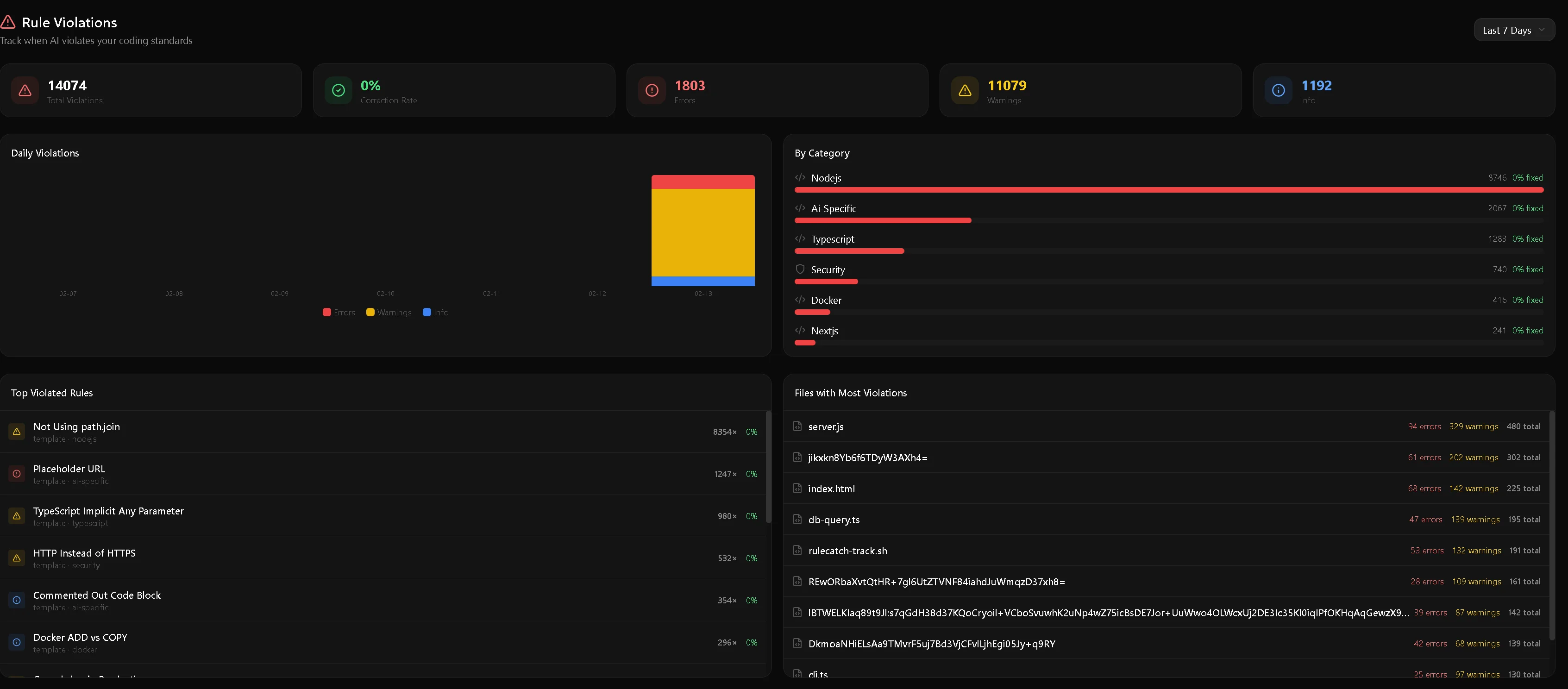
The RuleCatch dashboard — violation trends, category breakdown, per-file attribution, and top triggered rules at a glance. Configure alerts via Slack, Discord, PagerDuty, and more.
Full Setup (with API Key)
# Install the AI-Pooler with your API key (hooks into Claude Code automatically)
npx @rulecatch/ai-pooler init --api-key=dc_your_key --region=us

# Add the MCP server to query violations from Claude
npx @rulecatch/mcp-server init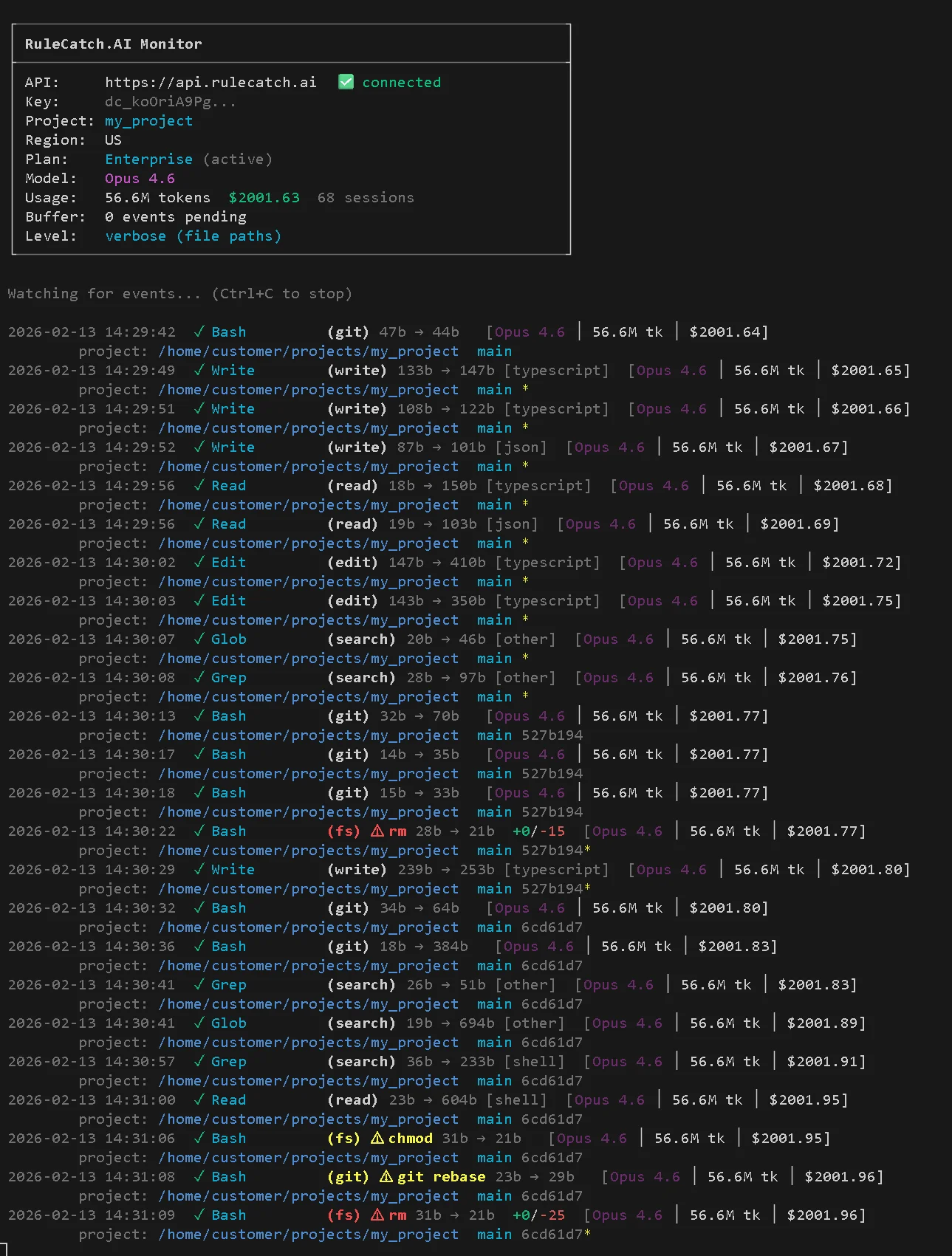
The AI-Pooler free monitor in action — tokens, cost, and tool usage updating in real time. Try it now: open a separate terminal and run npx @rulecatch/ai-pooler monitor --no-api-key
Recommended MCP Servers
MCP (Model Context Protocol) servers extend Claude's capabilities by giving it tools beyond reading and writing files. Each server below solves a specific problem in AI-assisted development. All are optional — install the ones that fit your workflow.
Context7 — Live Documentation
Claude's training data has a knowledge cutoff. When it generates code for a library, it might use APIs that have been renamed, deprecated, or don't exist in your version. Context7 fetches up-to-date, version-specific documentation and code examples directly from official sources and injects them into Claude's context.
What it solves: Hallucinated APIs, outdated code patterns, version mismatches
How to use: Add use context7 to your prompt — Context7 automatically identifies the relevant library and fetches current docs
claude mcp add context7 -- npx -y @upstash/context7-mcp@latestnpm: @upstash/context7-mcp · GitHub
GitHub MCP — Repository Management
Gives Claude direct access to the GitHub API — create and review PRs, manage issues, trigger CI/CD workflows, search code across repos, and handle branch operations. Instead of switching between Claude and the GitHub UI, Claude can do it all in-session.
What it solves: Context-switching between Claude and GitHub for PR reviews, issue management, and CI/CD
Toolsets: Repository management, issues, pull requests, actions, code security, discussions, notifications
claude mcp add github -- npx -y @modelcontextprotocol/server-githubNote: GitHub has also released an official GitHub MCP Server with expanded toolsets.
npm: @modelcontextprotocol/server-github · GitHub (official)
Playwright MCP — Browser Automation
Gives Claude the ability to interact with web pages through structured accessibility snapshots — no vision models or screenshots needed. Claude can navigate pages, click elements, fill forms, and verify content using the page's accessibility tree.
What it solves: E2E test debugging, verifying UI behavior, interacting with web apps during development
How it works: Uses Playwright's accessibility tree (not screenshots) — fast, lightweight, and LLM-friendly. Supports Chrome, Firefox, WebKit, and 143+ device emulation profiles
claude mcp add playwright -- npx -y @playwright/mcp@latestnpm: @playwright/mcp · GitHub
ClassMCP — Semantic CSS for AI
By TheDecipherist — open source (MIT license)
MCP server that provides semantic CSS class patterns to Claude, reducing token usage when working with styles. Instead of Claude guessing class names or hallucinating utility classes, ClassMCP feeds it the correct patterns from your project's CSS framework. Auto-included in all CSS-enabled profiles.
What it solves: Hallucinated CSS class names, inconsistent styling patterns, wasted tokens on style guessing
claude mcp add classmcp -- npx -y classmcp@latestStrictDB-MCP — Database Context for AI
By TheDecipherist — open source (MIT license)
MCP server that gives Claude direct access to StrictDB schema discovery, query validation, and explain plans. Claude can inspect collection schemas, dry-run queries before execution, and understand your database structure without you pasting it into context. Auto-included in all database-enabled profiles.
What it solves: Hallucinated collection names, wrong field types, queries that fail on execution, missing context about database schema
claude mcp add strictdb-mcp -- npx -y strictdb-mcp@latestnpm: strictdb-mcp
RuleCatch MCP — AI Session Analytics
Already covered in detail in the Monitor Your Rules section above. Gives Claude direct read access to violation data so it can query what rules it's breaking and generate fix plans.
npx @rulecatch/mcp-server initSee the Claude Code Mastery Guide for the complete MCP server directory.
Screenshots
The starter kit in action — every screenshot is from real command output.
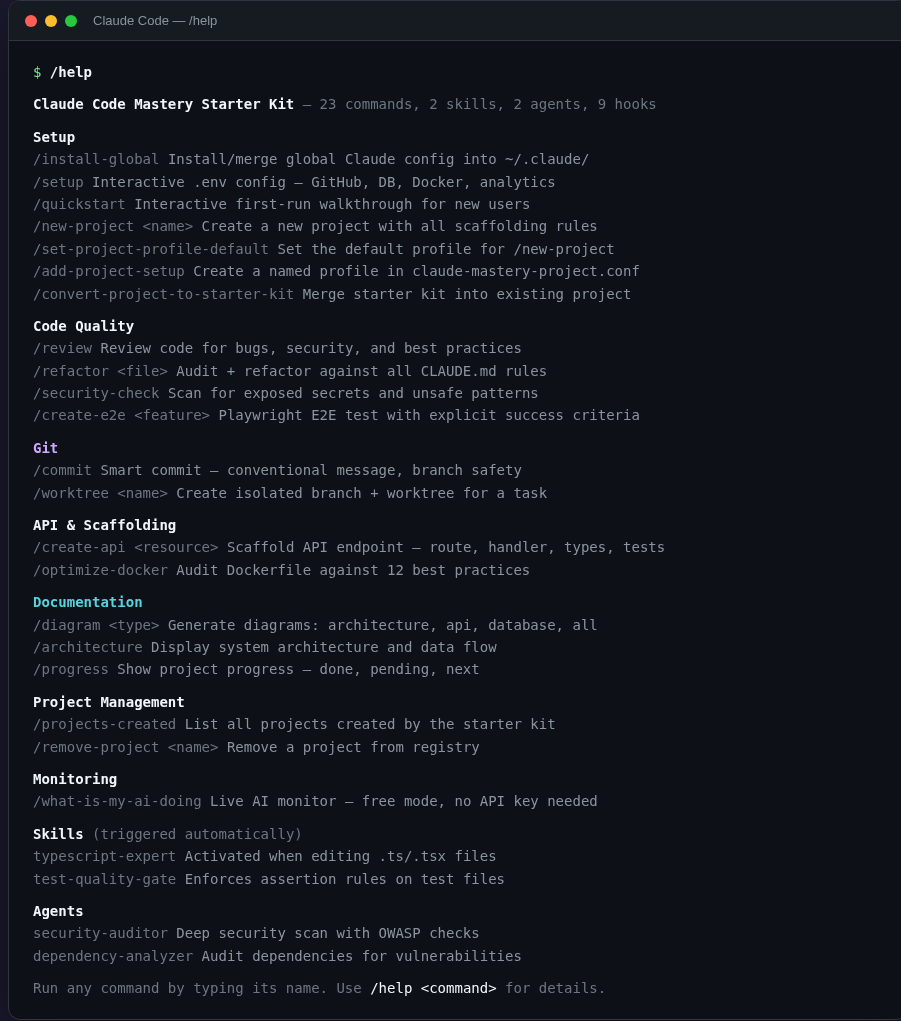
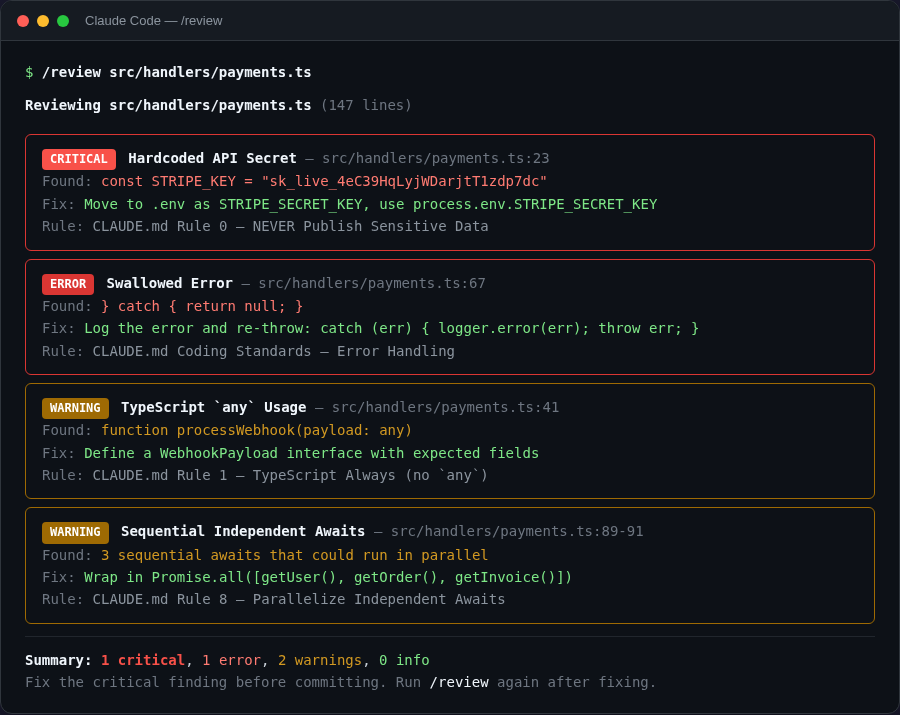
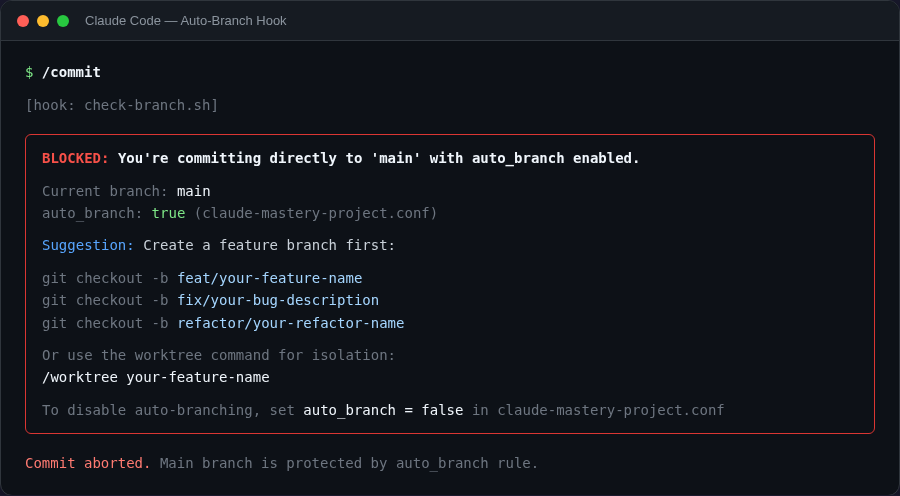
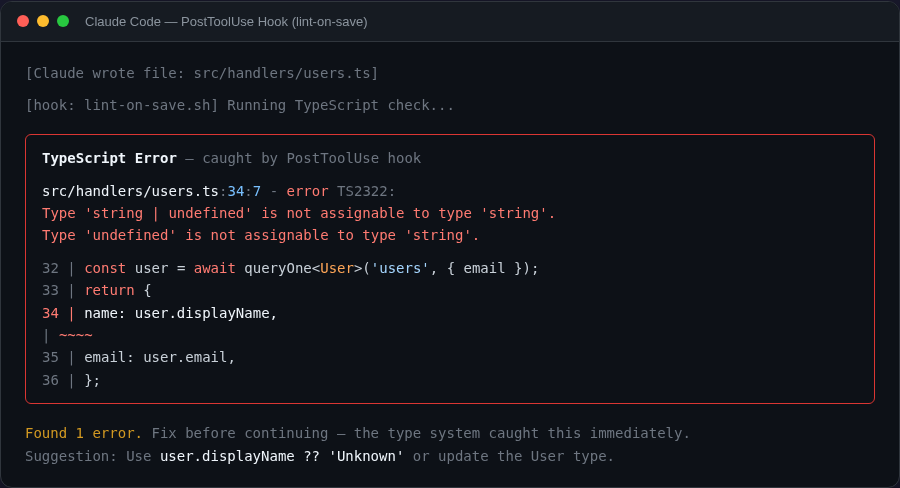
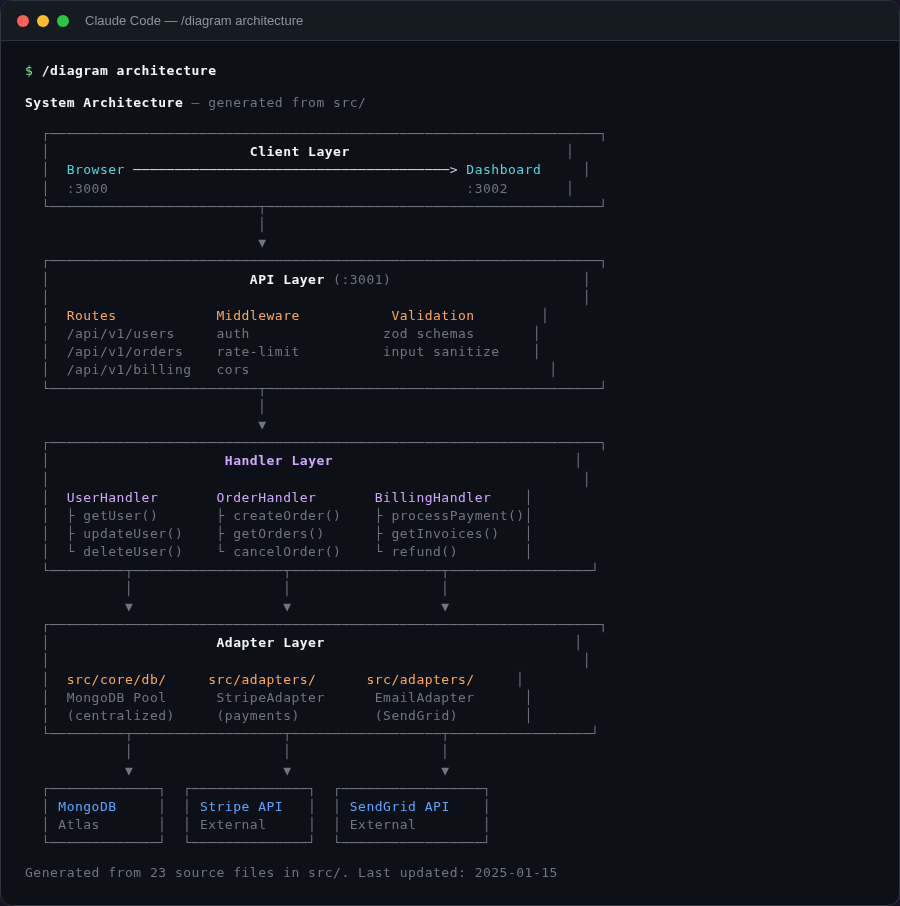
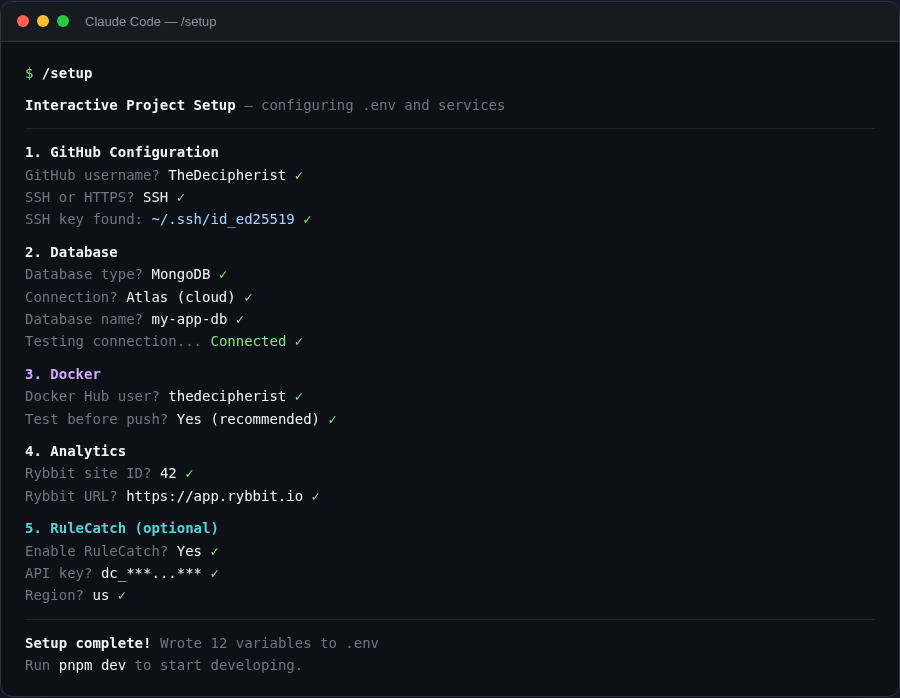
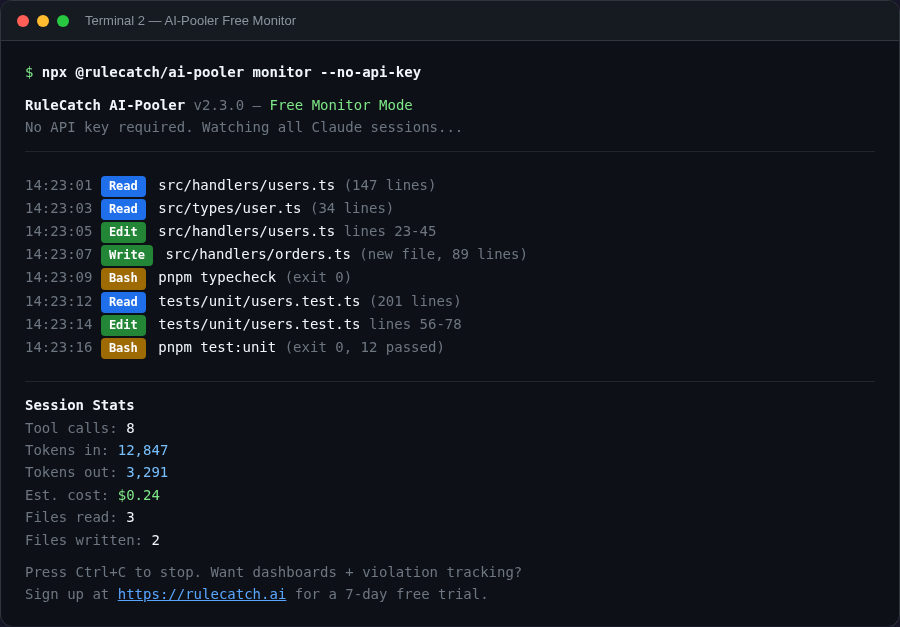
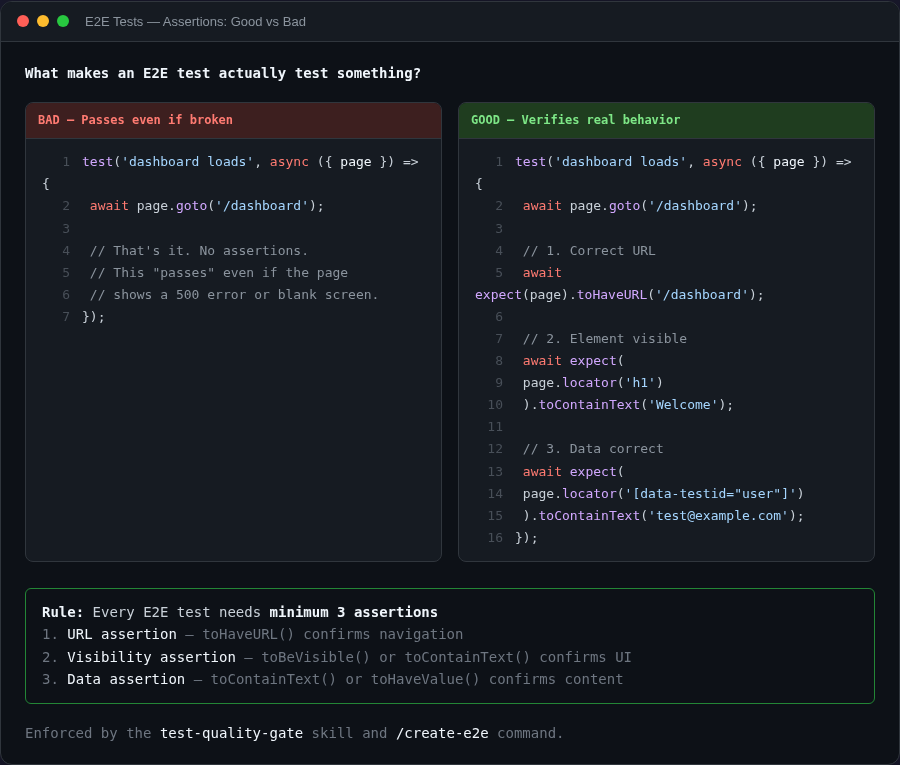
Credits
Based on the Claude Code Mastery Guide series by TheDecipherist:
- V1: Global CLAUDE.md, Security Gatekeeper, Project Scaffolding, Context7
- V2: Skills & Hooks, Enforcement over Suggestion, Quality Gates
- V3: LSP, CLAUDE.md, MCP, Skills & Hooks
- V4: 85% Context Reduction, Custom Agents & Session Teleportation
- V5: Renaming Problem, Plan Mode, Testing Methodology & Rules That Stick
Community contributors: u/BlueVajra, u/stratofax, u/antoniocs, u/GeckoLogic, u/headset38, u/tulensrma, u/jcheroske, u/ptinsley, u/Keksy, u/lev606